Showing posts with label PhotoSmith. Show all posts

Friday, November 30, 2012

Well, the Seagate Go Flex Didn't Solve My iPad Photo Back-Up Challenge, Maybe The Maxell Airstash Will...

 
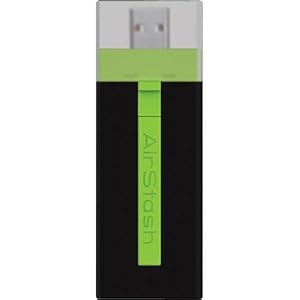
The Maxell Airstash
Image Source: http://www.amazon.com/Maxell-AirStash-Expandable-Capacity-Wireless/dp/B006473T92/ref=sr_1_2?ie=UTF8&qid=1354189519&sr=8-2&keywords=maxell+airstash
 
As I mentioned yesterday, the promising combination of the PhotoSmith app and the Seagate Go Flex wireless hard drive let me down, in that they no longer allow you to write files from the iPad to the drive. This is obviously critical for the iPad to be a great back-up tool for photographers.
 
Here's my next attempt - the Maxell Airstash. This is a different approach, which allows you to connect an SD card to your iPad wirelessly. The description clearly states that the iPad will write files to the SD card. I sure hope it's true.
 
With the Airstash, my plan will be to carry a lot of SD cards of matched size. I'll shoot with one in my camera, then use the iPad to copy all of the files to both the iPad and to a second SD card. That's significant back-up (three copies).
 
Here's some of the pluses of this approach:
  • Solid State (SD Card) media
  • No moving parts
  • Fast read and write speeds
  • Easy to carry a lot of data in the form of SD cards
  • Does not rely on using the PhotoSmith app, which I have found to be less than 100% reliable
  • Easy to upload when I do get home. Just grab one copy on SD card and pop it in the desktop card reader.
Here are some negatives:
  • Solid State (SD Card) media - low storage capacity (per card) compared to the 500 Mb Go Flex
  • Wireless - I would be happier if I simply had the ability to write to an SD card from the iPad, using the Apple Camera Connect Kit. It would be faster. I simply don't need wireless for this application. However, I may use it for other things in the future.
  • Internal rechargeable battery - will have a limited lifetime. I wouldn't mind plugging in to AC, or better yet, have it powered from a USB connection.
  • Since you can't easily delete photos from the iPad without connecting to a host computer, I'm still limited in overall capacity to what's on the iPad (64 Gb max).
I'm returning the Go Flex, and have ordered the Airstash. I'll let you know how it goes. If this doesn't work, I will seriously consider the Macbook Air with 256 Gb storage. I'd still much rather have the iPad be my solution.
Let's hope the Airstash lives up to the marketing info.
 
 
DMC-365.blogspot.com


Thursday, November 29, 2012

Not Quite Ready for Photography Back-up Perfection - the iPad

Apple iPad 2
Image Source: http://www.apple.com/ipad/compare/
 
So, I've been using an Apple iPad for so many things in life recently. I really love the device, and it goes everywhere with me - mainly for work, but at home and on travel as well.
 
My meeting notes and plans are so much better organized than in the past, and always with me. The app Evernote has made that happen for me. But, you're here to read about photography...
 
I've been using the iPad for photo backup on travel. The Apple Camera Connect Kit ($29) allows me to transfer fiiles from an SD card (from the camera) to the iPad. That's great. Here are the current limitations:
 
  1. Limited storage (64 Gb total) on the iPad.
  2. The iPad will only upload photos into its own photo app.
  3. No way to export to a hard drive to have a second copy of the files.
  4. Limited capability in apps to organize, rate, and store photos.
On the positive side, if you have access to the internet, with LOTS of bandwidth (more than most hotels offer), you can use the iPad to upload photos for backup. One great solution for this is flickr, which allows you to upload (and hide if you wish) unlimited jpegs for $25 per year. The only drawback there is that you can't backup your raw files. But, it's sure a nice way to have at least your jpegs safely copied online.
If you don't have internet access, options are quite limited. What I've been doing is copying files from my SD cards to the iPad, AND keeping them on the SD card as well. This is not a bad solution, as SD cards are quite inexpensive now, and it's easy to carry a lot of memory in a very small volume. But, once I reach 64 Mb (which includes all of my applications and documents on the iPad), I'm kind of stuck.
 
I thought I had a fix recently. I purchased a book specifically about the iPad for photographers. I won't list it here, because the fact that it's already out of date is causing me problems. I can't recommend the book to my readers. Anyway, at one point in time, the photo app PhotoSmith (www.photosmithapp.com) had the capability of sending photos to a compact wireless hard disk from Seagate.
 
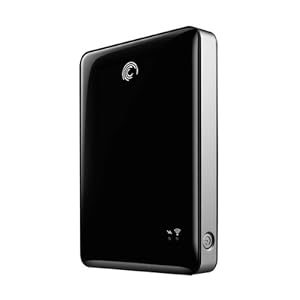
Seagate Go Flex 500 Gb Wireless Hard Disk
Image Source: http://www.amazon.com/Seagate-Satellite-Wireless-External-STBF500101/dp/B004Z0S7K6/ref=sr_1_1?ie=UTF8&qid=1354106017&sr=8-1&keywords=seagate+goflex
 
This drive is on sale for the reasonable price of $99 right now. So, I bought one. Guess what? It no longer connects with PhotoSmith. According to PhotoSmith Technical Support, that's because of some issues on the Seagate side, and they hope to fix it soon. But for now, it won't allow me to move photos from the iPad to the Go Flex.
 
Now, about the Go Flex. It's pretty cool. If you want to load up an enormous amount of video, photos, music, etc. for a trip (loading from a PC with USB), you can share all of that wirelessly to up to three devices (including iPads). So, you can keep the whole family happy with movies for a long drive. But, you can't move anything from the iPad to the Go Flex at this point. So, it doesn't solve my backup problem.
 
Another exciting development is the Kingston solid state wireless drive. That's a topic for a later post, as I haven't fully investigated it yet. However, at this time, I believe it has the same issue with transferring files from the iPad. Once this is solved, either device will be a killer solution.
 
A quick note on the PhotoSmith app. It's pretty good in most ways. It allows me to import photos from the Apple photo app to PhotoSmith (both on the iPad). Once I've done that, I can sort, rank, and flag my files, just like I do in Lightroom at home. And, there's a publish plug-in for Lightroom that allows me to transfer those files wirelessly once I get home, directly into Lightroom on my desktop machine, ratings and all. Now, this is not seamless. It has limitations. I've had a hard time getting ALL of my photos to transfer, and you don't have much flexibility in deciding where they transfer to on your desktop (they go in a PhotoSmith directory in MyPhotos on the PC, which is not where I want them). Overall, I give PhotoSmith 3 out of 5 stars. I'm sure it will improve.
 
I really love the iPad, and think the iPad Mini could be the right solution for travel photography backup, once it can send files to an external drive (by the way, that doesn't need to be wireless for me; a wired drive would be fine).
 
So, all of this leaves me thinking - what about just going to the Apple MacBook Air? I could carry a 256 Gb Air and a normal USB drive, and instantly have two copies of my photos, and free up my SD cards to be reformatted. And, if I have internet connectivity, it's even better. The Air is more expensive. It also lacks the nice touch screen interface of the iPad. I'd much rather solve the few remaining issues with the iPad and maybe go to the mini.
 
So, there's a quick update on the status of the iPad for photographers, as I see it. If others have found nice solutions, please let me know.
 
DMC-365.blogspot.com