Showing posts with label backup. Show all posts

Monday, December 9, 2013

Backing Up Files on iPad - One Step Closer - My Travel Backup System

 
Pogoplug Series 4 Sharing Device
Image Source: http://www.adorama.com/COCPOGOV4A3.html?EmailPrice=T


I've gone through several devices looking for the best way to backup files during travel with my Apple iPad (not requiring me to carry a laptop computer). I was looking for a way to backup raw files and jpegs, even when I may not have access to the internet. I tried multiple wireless hard disks that were advertised as having the ability to move files from the iPad; none of them worked.
 
What I've been doing in the face of this failure is basically making sure I have two copies of every file in a very basic way. I always carry enough SD cards that I don't have to format them during my travel. After filling one up (or after a day of shooting), I use the Apple Camera Connect kit to plug the SD into the iPad and transfer files. This gives me tens of Gigabytes of backup, and the iPad automatically moves both raw and jpeg files. Then, I put the SD away in a different case, so that I remember it's full. Now I have one copy on the SD, and one on the iPad, without the need for an internet connection.
 
Once I'm connected to the internet again, I can upload files to flickr, but that's pretty darned slow in my experience. That's where this little beauty comes in. The Pogoplug is a network file sharing device that you plug in to your network at home. Then, you connect storage to it - this can be anything from an SD card, to a USB hard drive (USB3 that is), or directly connect a hard drive that has the 2.5" SATA interface. I had a 1Tb Iomega USB drive that I connected for now. It gives you a dedicated connection, which makes it much faster than uploading to flickr.
 
So, once you've got that going, you download the Pogoplug app for the iPad (from the Apple App Store). It's free. You can set it up so that anytime you're connected to the internet and the app is open (yes, it must be open), the system will automatically backup your jpeg files from your iPad Camera Roll to the hard drive at home, no matter where you are. This is handy, especially if you use a wifi-enabled camera (like my Panasonic Lumix DMC-GX7 or Lumix DMC-TS5) to upload to the iPad. Then it's all seamless.
 
Here's the limitation - both Lumix wifi and Pogoplug are limited to only jpegs - they won't upload raw files.
 
So, my workaround (assuming I need to backup raw files) is this - I don't use wifi to transfer from the camera to the iPad, but use the Apple Camera Connect as stated above to get a second copy of my jpegs and raw files onto the iPad. Then, the Pogoplug app requires that I go in and select the images in my Imported folder on the iPad for upload to the disk at home. Easy, and quite fast. It will be even faster when I get a dedicated hard drive directly connected to the Pogoplug.
 
So, what does this give me? Two copies of all files, and a third of the jpegs only:
 
  1. The original raw and jpeg files stored on the SD card I used in the camera.
  2. Second copies of both raw and jpeg files imported to the iPad (using the Apple Camera Connect kit).
  3. Third copies of jpegs only backed up on the Pogoplug hard drive at home. These would save me if I dropped my camera bag and iPad into the ocean or something.
This means I have to carry a lot of SD cards, but they're small, lightweight, highly reliable, and relatively low cost.
 
I don't like that the Pogoplug app will only copy jpegs, but the silver lining is that upload of jpegs is very fast. Maybe they'll add raw capability in a firmware upgrade. Wouldn't that be great?
 
The Pogoplug adapter is very inexpensive. Purchase yours at the link below.
 
DMC-365.blogspot.com


Thursday, November 29, 2012

Not Quite Ready for Photography Back-up Perfection - the iPad

Apple iPad 2
Image Source: http://www.apple.com/ipad/compare/
 
So, I've been using an Apple iPad for so many things in life recently. I really love the device, and it goes everywhere with me - mainly for work, but at home and on travel as well.
 
My meeting notes and plans are so much better organized than in the past, and always with me. The app Evernote has made that happen for me. But, you're here to read about photography...
 
I've been using the iPad for photo backup on travel. The Apple Camera Connect Kit ($29) allows me to transfer fiiles from an SD card (from the camera) to the iPad. That's great. Here are the current limitations:
 
  1. Limited storage (64 Gb total) on the iPad.
  2. The iPad will only upload photos into its own photo app.
  3. No way to export to a hard drive to have a second copy of the files.
  4. Limited capability in apps to organize, rate, and store photos.
On the positive side, if you have access to the internet, with LOTS of bandwidth (more than most hotels offer), you can use the iPad to upload photos for backup. One great solution for this is flickr, which allows you to upload (and hide if you wish) unlimited jpegs for $25 per year. The only drawback there is that you can't backup your raw files. But, it's sure a nice way to have at least your jpegs safely copied online.
If you don't have internet access, options are quite limited. What I've been doing is copying files from my SD cards to the iPad, AND keeping them on the SD card as well. This is not a bad solution, as SD cards are quite inexpensive now, and it's easy to carry a lot of memory in a very small volume. But, once I reach 64 Mb (which includes all of my applications and documents on the iPad), I'm kind of stuck.
 
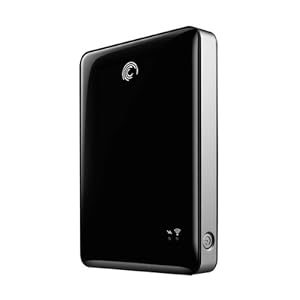
I thought I had a fix recently. I purchased a book specifically about the iPad for photographers. I won't list it here, because the fact that it's already out of date is causing me problems. I can't recommend the book to my readers. Anyway, at one point in time, the photo app PhotoSmith (www.photosmithapp.com) had the capability of sending photos to a compact wireless hard disk from Seagate.
 
Seagate Go Flex 500 Gb Wireless Hard Disk
Image Source: http://www.amazon.com/Seagate-Satellite-Wireless-External-STBF500101/dp/B004Z0S7K6/ref=sr_1_1?ie=UTF8&qid=1354106017&sr=8-1&keywords=seagate+goflex
 
This drive is on sale for the reasonable price of $99 right now. So, I bought one. Guess what? It no longer connects with PhotoSmith. According to PhotoSmith Technical Support, that's because of some issues on the Seagate side, and they hope to fix it soon. But for now, it won't allow me to move photos from the iPad to the Go Flex.
 
Now, about the Go Flex. It's pretty cool. If you want to load up an enormous amount of video, photos, music, etc. for a trip (loading from a PC with USB), you can share all of that wirelessly to up to three devices (including iPads). So, you can keep the whole family happy with movies for a long drive. But, you can't move anything from the iPad to the Go Flex at this point. So, it doesn't solve my backup problem.
 
Another exciting development is the Kingston solid state wireless drive. That's a topic for a later post, as I haven't fully investigated it yet. However, at this time, I believe it has the same issue with transferring files from the iPad. Once this is solved, either device will be a killer solution.
 
A quick note on the PhotoSmith app. It's pretty good in most ways. It allows me to import photos from the Apple photo app to PhotoSmith (both on the iPad). Once I've done that, I can sort, rank, and flag my files, just like I do in Lightroom at home. And, there's a publish plug-in for Lightroom that allows me to transfer those files wirelessly once I get home, directly into Lightroom on my desktop machine, ratings and all. Now, this is not seamless. It has limitations. I've had a hard time getting ALL of my photos to transfer, and you don't have much flexibility in deciding where they transfer to on your desktop (they go in a PhotoSmith directory in MyPhotos on the PC, which is not where I want them). Overall, I give PhotoSmith 3 out of 5 stars. I'm sure it will improve.
 
I really love the iPad, and think the iPad Mini could be the right solution for travel photography backup, once it can send files to an external drive (by the way, that doesn't need to be wireless for me; a wired drive would be fine).
 
So, all of this leaves me thinking - what about just going to the Apple MacBook Air? I could carry a 256 Gb Air and a normal USB drive, and instantly have two copies of my photos, and free up my SD cards to be reformatted. And, if I have internet connectivity, it's even better. The Air is more expensive. It also lacks the nice touch screen interface of the iPad. I'd much rather solve the few remaining issues with the iPad and maybe go to the mini.
 
So, there's a quick update on the status of the iPad for photographers, as I see it. If others have found nice solutions, please let me know.
 
DMC-365.blogspot.com