Showing posts with label iPad. Show all posts

Thursday, October 26, 2017

7 Day Black & White Challenge


My friend and co-worker nominated me to take part in a photo challenge on facebook, specifically, a 7-day black and white challenge.  The images are to be presented without words or description, and should not include people as subjects.

(Click Here) to see the challenge.

I’ve shown my results for days 1-4 above, all shot with either my iPhone SE or iPad Air.

Great fun, so far.

UPDATE:  Here's the final three


Dmc-365.blogspot.com

Tuesday, November 24, 2015

Just for Fun

I think it's pretty cool that my writing table at Peet's Coffee is an old bowling alley lane.
 
Shot with my Apple iPad Air.
 
DMC-365.blogspot.com


Monday, September 7, 2015

A Glass Menagerie - Panasonic Lumix DMC-TS5

I carry a camera with me every day. Today, it happened to be my little waterproof Lumix TS5, which I was bringing in to work to loan to a friend. The camera has accompanied her to Central America, and is now on its way to Tibet.
 
Anyway, the building where I work represents one of the world's largest installations of structural glass. Walking to my office, I noticed these apparently random tracks on the condensed water droplets on the outside surface. Obviously not guided by gravity, these tracks twist and turn, intersecting themselves and wandering both up and down. After looking at a few of them closely, I determined the source.
 
Slug, by Reed A. George
Panasonic Lumix DMC-TS5
 
At about 1 1/2" in length, these guys cover some territory.
 
Further down the hall, I found this predator:
 
Praying Mantis, by Reed A. George
Panasonic Lumix DMC-TS5
 
I'm not sure if a mantis will eat slugs, but I have a suspicion they will. Quite an interesting little world in operation just on the other side of the glass...
 
The TS5's macro capability came in handy here. The wifi did as well, allowing me to quickly transfer the images to my iPad so I could include them in this morning's post.
 
Then, I look up from the table where I'm writing and see this:
 
 
I grabbed this shot with the iPad's onboard camera. Okay, digital imaging can be pretty cool.
 
DMC-365.blogspot.com


Sunday, July 5, 2015

Did You Get a Release for That?

Model releases can be very important for certain types of photography. I didn't get a release for this shot, as I'm not inclined to sue myself for posting a picture of my kid. But, you get the point.
 
I've actually been waiting to see an iPhone app that takes care of model releases for the mobile photographer. And, it's here. This app from Snapwire not only allows you to get signatures on the fly, on your phone, it integrates with several other applications, including Dropbox and Evernote (my choice of document organization tools).
 
(Click Here) to read about the app on DIYPhotography.net
 
 
DMC-365.blogspot.com


Monday, April 27, 2015

Live Oak Tree - Lousiana Plantation - From Raw Image to Interpretation

I just returned yesterday from the LHSA (International Leica Society) Spring Shoot in New Orleans, Louisiana.
 
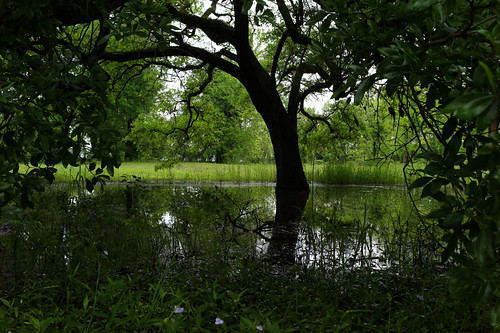
One of our (brilliant) activities was a visit to Belle Haven Plantation, which has been closed to the public for many years. We were extremely lucky to get access. The enormous live oak trees on the property were so beautiful. Here's a raw image that I took of one of them.
 
Live Oak, Starting Image, by Reed A. George
Leica M9, Summicron 35mm f2 Lens
iso 400, f5.6, 1/60 sec.
 
I walked out into a huge puddle of standing water to get this shot. I exposed to keep the highlights from blowing out, knowing that I could recover detail from the shadows with the M9 file. Right out of the camera, it looks underexposed.
 
I decided to do a quick edit on the image in Snapseed, on my iPad. Here's the result.
 
Live Oak, Interpretation, by Reed A. George
 
I'm sure that I can make a nice straight image from this file, but I kind of like this manipulated version. I purposefully added the vignetting around the edges, simply because I like the look.
 
Maybe I'll post the same image processed in Lightroom with much less manipulation. It will be interesting to see which version I like best.
 
If you're interested in the LHSA, check us out by (Clicking Here).
 
DMC-365.blogspot.com
 

Friday, December 5, 2014

I Like This - Bizarre Panorama With iPad Air in NYC

Bizzare City, by Reed A. George
Shot From a Moving Bus
 
This image is really worth looking at closely.
 
(Click Here) to see it on flickr, where you can zoom in.
 
DMC-365.blogspot.com
 

Arrived in New York City

I was playing with the panorama setting on my iPad camera on the bus ride from Arlington, Virginia to New York City. Here are some examples.
The bottom two were shot from the moving bus.
 
Here are my traveling companions in our room.
It's a little chilly up here tonight, but the skies are clear and it's a great time to be in the City!
 
DMC-365.blogspot.com


Wednesday, November 5, 2014

Cropping and Composition - Just an Exercise

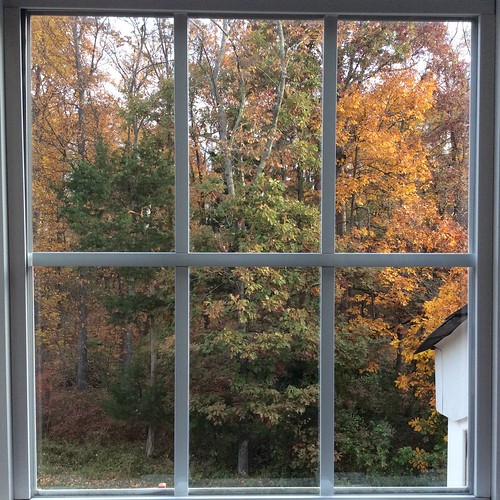
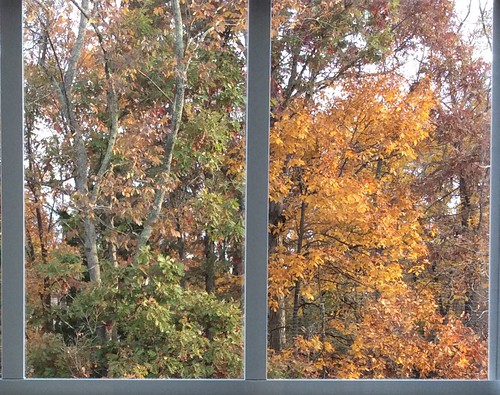
I saw this scene outside my window today.
 
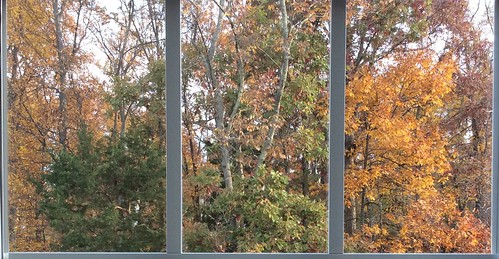
I thought it presented an interesting opportunity to try cropping in multiple ways. So, I shot it with my iPad and proceeded to play around, cropping into various configurations based on the window pane lines.
 
My first try was this, based solely on my gut feeling of what may look best:
 
Then, I tried others:
 
 
I realized at this point that the bright sky detracted from most compositions. Then, I decided to try some vertical crops.


This one turned out to be my favorite. I added a few touches in Snapseed, including a white frame, and this is what resulted:
 
Not a masterpiece, by any means, it did help me to think about cropping and composition. At first, the little bit of my house that shows in the picture seemed like a distraction; I would not have picked a composition that included it. In the end, it turned out to be the best subset of the original picture to show.
 
If nothing else, this reminds me that my first inclination on how to compose a scene may not be the best. It's worth playing around and trying different compositions.
 
DMC-365.blogspot.com
 

Monday, December 9, 2013

Backing Up Files on iPad - One Step Closer - My Travel Backup System

 
Pogoplug Series 4 Sharing Device
Image Source: http://www.adorama.com/COCPOGOV4A3.html?EmailPrice=T


I've gone through several devices looking for the best way to backup files during travel with my Apple iPad (not requiring me to carry a laptop computer). I was looking for a way to backup raw files and jpegs, even when I may not have access to the internet. I tried multiple wireless hard disks that were advertised as having the ability to move files from the iPad; none of them worked.
 
What I've been doing in the face of this failure is basically making sure I have two copies of every file in a very basic way. I always carry enough SD cards that I don't have to format them during my travel. After filling one up (or after a day of shooting), I use the Apple Camera Connect kit to plug the SD into the iPad and transfer files. This gives me tens of Gigabytes of backup, and the iPad automatically moves both raw and jpeg files. Then, I put the SD away in a different case, so that I remember it's full. Now I have one copy on the SD, and one on the iPad, without the need for an internet connection.
 
Once I'm connected to the internet again, I can upload files to flickr, but that's pretty darned slow in my experience. That's where this little beauty comes in. The Pogoplug is a network file sharing device that you plug in to your network at home. Then, you connect storage to it - this can be anything from an SD card, to a USB hard drive (USB3 that is), or directly connect a hard drive that has the 2.5" SATA interface. I had a 1Tb Iomega USB drive that I connected for now. It gives you a dedicated connection, which makes it much faster than uploading to flickr.
 
So, once you've got that going, you download the Pogoplug app for the iPad (from the Apple App Store). It's free. You can set it up so that anytime you're connected to the internet and the app is open (yes, it must be open), the system will automatically backup your jpeg files from your iPad Camera Roll to the hard drive at home, no matter where you are. This is handy, especially if you use a wifi-enabled camera (like my Panasonic Lumix DMC-GX7 or Lumix DMC-TS5) to upload to the iPad. Then it's all seamless.
 
Here's the limitation - both Lumix wifi and Pogoplug are limited to only jpegs - they won't upload raw files.
 
So, my workaround (assuming I need to backup raw files) is this - I don't use wifi to transfer from the camera to the iPad, but use the Apple Camera Connect as stated above to get a second copy of my jpegs and raw files onto the iPad. Then, the Pogoplug app requires that I go in and select the images in my Imported folder on the iPad for upload to the disk at home. Easy, and quite fast. It will be even faster when I get a dedicated hard drive directly connected to the Pogoplug.
 
So, what does this give me? Two copies of all files, and a third of the jpegs only:
 
  1. The original raw and jpeg files stored on the SD card I used in the camera.
  2. Second copies of both raw and jpeg files imported to the iPad (using the Apple Camera Connect kit).
  3. Third copies of jpegs only backed up on the Pogoplug hard drive at home. These would save me if I dropped my camera bag and iPad into the ocean or something.
This means I have to carry a lot of SD cards, but they're small, lightweight, highly reliable, and relatively low cost.
 
I don't like that the Pogoplug app will only copy jpegs, but the silver lining is that upload of jpegs is very fast. Maybe they'll add raw capability in a firmware upgrade. Wouldn't that be great?
 
The Pogoplug adapter is very inexpensive. Purchase yours at the link below.
 
DMC-365.blogspot.com


Saturday, June 29, 2013

Over - A Nice App For Adding Text to Images on iPad

 
Just Playing Around
 
You know how Starbucks has those little cards giving away a free App or song each week? This week's App in my local store is called "Over." Over is an image editing program, which allows you to add text or art to your pictures. Pretty darned cool.
 
I downloaded Over from the App store, and played around a little with it, just using images that were already on my iPad. This is a very simple way to add text to your images. I'm thinking of making electronic postcards from your beach vacation, for example. Here's a hint: once you've added text and hit "Done," use the yellow arrow on the right of the screen to find options for how to modify it. The options that come up are on a wheel, which you can spin for more options. I'm sure this doesn't make sense, but it will once you open the App. Finding the wheel is necessary to be able to save your image, for example.
 
Here's another image I played around with:
 
Could Be Useful
 
Hmm. No bad for the price (free).
 
DMC-365.blogspot.com


Wednesday, June 26, 2013

This Might Be A Fun Little Gadget - The Kick by Photojojo

 
Photojojo is marketing "The Kick," an LED light array, complete with an iOS (iPhone, iPad, iPod Touch) app. You can use it to light photographic scenes, either attached to your iPhone, or remotely. It even has a tripod mount so you can stably mount it just about anywhere.
 
The Kick provides constant light (not strobe), and has the following features:
 
  • Color balance via the app (2,500 - 10,000 K)
  • Intensity control
  • Tripod mount
  • Rechargeable Li ion battery (charge with USB)
  • Ability to sample light and mimic color balance with the LEDs
There are some pretty cool example shots on the website.
 
(Click Here) to investigate The Kick on Photojojo
 
Cute. $179 cute? Hmm. That seems like a lot. Probably not buying one this week.
 
DMC-365.blogspot.com


Friday, November 30, 2012

More Unfulfilled Promise - the Maxell Airstash

 
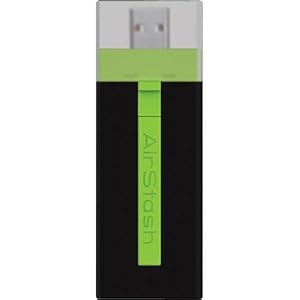
Maxell Airstash
Image Source: http://www.amazon.com/Maxell-AirStash-Expandable-Capacity-Wireless/dp/B006473T92/ref=sr_1_2?ie=UTF8&qid=1354189519&sr=8-2&keywords=maxell+airstash
 
So close, but yet so far. Let me save you some reading if you like: AIRSTASH DOES NOT ALLOW TRANSFER OF RAW FILES FROM THE IPAD.
 
My Airstash arrived yesterday, and after a few blips in upgrading the firmware, was ready to go. Very promising. The app (Airstash+) actually has a simple interface. Click the little camera icon, and you can say whether you want to import (from Airstash to iPad) or export (to the Airstash), select your images, and go. So, I did a test with ~250 images stored on the iPad (in both jpeg and raw) during a meeting. I was elated. Within 40 minutes it was done. So cool!
 
The transfer rate was not fast, but certainly acceptable. The devise design is nice - it's very small, light, not much more in your bag than a normal SD card - USB adapter.
 
Then came the final part of the test. Plugging the Airstash into my desktop, I looked at my transferred images. What? No raw files! Just jpegs. The transfer changed all of my raws into jpegs.
 
I thought there must be a setting that I missed. There isn't. In fact, there are so few settings that I scanned all of them three times in a few minutes. So, reluctantly, I called the 24/7 Maxell service line.
 
After a several minute hold, I got a real person. He immediately told me that I'd have to do some internet research, and that this functionality was on the app end, which is produced by a third party. I replied that I had read the MAXELL web page extremely carefully before making this purchase, and that it clearly indicated compatibility with raw files. After pushing back, he agreed to talk with someone else there at Maxell. He came back on the phone after consulting with the Airstash Support Manager, and informed me that the software automatically converts raw files to jpeg upon export to the Airstash. There is nothing you can do to change that. I calmly informed him that this "feature" makes the device completely unhelpful to serious photographers, and it's on its way back. He said "Okay, thank you!" and we were done.
 
A couple of you have suggested divorcing from Apple for this function. I'm afraid I may have to agree with you. I'm so hooked on the iPad interface and apps for other purposes, it is difficult to consider something else. But, it just won't seem to help me out here.
 
I thought Apple's strongest core of users came from the arts, science, and imaging worlds. How can they not see the need to give this to us photographers?
 
I'm going to take a break from this pursuit for a while. I'm not doing any more big travel until spring...
 
DMC-365.blogspot.com


Well, the Seagate Go Flex Didn't Solve My iPad Photo Back-Up Challenge, Maybe The Maxell Airstash Will...

 
The Maxell Airstash
Image Source: http://www.amazon.com/Maxell-AirStash-Expandable-Capacity-Wireless/dp/B006473T92/ref=sr_1_2?ie=UTF8&qid=1354189519&sr=8-2&keywords=maxell+airstash
 
As I mentioned yesterday, the promising combination of the PhotoSmith app and the Seagate Go Flex wireless hard drive let me down, in that they no longer allow you to write files from the iPad to the drive. This is obviously critical for the iPad to be a great back-up tool for photographers.
 
Here's my next attempt - the Maxell Airstash. This is a different approach, which allows you to connect an SD card to your iPad wirelessly. The description clearly states that the iPad will write files to the SD card. I sure hope it's true.
 
With the Airstash, my plan will be to carry a lot of SD cards of matched size. I'll shoot with one in my camera, then use the iPad to copy all of the files to both the iPad and to a second SD card. That's significant back-up (three copies).
 
Here's some of the pluses of this approach:
  • Solid State (SD Card) media
  • No moving parts
  • Fast read and write speeds
  • Easy to carry a lot of data in the form of SD cards
  • Does not rely on using the PhotoSmith app, which I have found to be less than 100% reliable
  • Easy to upload when I do get home. Just grab one copy on SD card and pop it in the desktop card reader.
Here are some negatives:
  • Solid State (SD Card) media - low storage capacity (per card) compared to the 500 Mb Go Flex
  • Wireless - I would be happier if I simply had the ability to write to an SD card from the iPad, using the Apple Camera Connect Kit. It would be faster. I simply don't need wireless for this application. However, I may use it for other things in the future.
  • Internal rechargeable battery - will have a limited lifetime. I wouldn't mind plugging in to AC, or better yet, have it powered from a USB connection.
  • Since you can't easily delete photos from the iPad without connecting to a host computer, I'm still limited in overall capacity to what's on the iPad (64 Gb max).
I'm returning the Go Flex, and have ordered the Airstash. I'll let you know how it goes. If this doesn't work, I will seriously consider the Macbook Air with 256 Gb storage. I'd still much rather have the iPad be my solution.
Let's hope the Airstash lives up to the marketing info.
 
 
DMC-365.blogspot.com


Thursday, November 29, 2012

Not Quite Ready for Photography Back-up Perfection - the iPad

Apple iPad 2
Image Source: http://www.apple.com/ipad/compare/
 
So, I've been using an Apple iPad for so many things in life recently. I really love the device, and it goes everywhere with me - mainly for work, but at home and on travel as well.
 
My meeting notes and plans are so much better organized than in the past, and always with me. The app Evernote has made that happen for me. But, you're here to read about photography...
 
I've been using the iPad for photo backup on travel. The Apple Camera Connect Kit ($29) allows me to transfer fiiles from an SD card (from the camera) to the iPad. That's great. Here are the current limitations:
 
  1. Limited storage (64 Gb total) on the iPad.
  2. The iPad will only upload photos into its own photo app.
  3. No way to export to a hard drive to have a second copy of the files.
  4. Limited capability in apps to organize, rate, and store photos.
On the positive side, if you have access to the internet, with LOTS of bandwidth (more than most hotels offer), you can use the iPad to upload photos for backup. One great solution for this is flickr, which allows you to upload (and hide if you wish) unlimited jpegs for $25 per year. The only drawback there is that you can't backup your raw files. But, it's sure a nice way to have at least your jpegs safely copied online.
If you don't have internet access, options are quite limited. What I've been doing is copying files from my SD cards to the iPad, AND keeping them on the SD card as well. This is not a bad solution, as SD cards are quite inexpensive now, and it's easy to carry a lot of memory in a very small volume. But, once I reach 64 Mb (which includes all of my applications and documents on the iPad), I'm kind of stuck.
 
I thought I had a fix recently. I purchased a book specifically about the iPad for photographers. I won't list it here, because the fact that it's already out of date is causing me problems. I can't recommend the book to my readers. Anyway, at one point in time, the photo app PhotoSmith (www.photosmithapp.com) had the capability of sending photos to a compact wireless hard disk from Seagate.
 
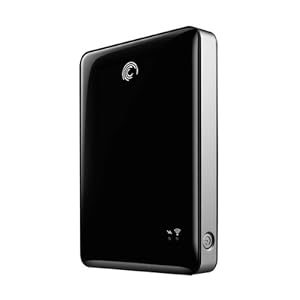
Seagate Go Flex 500 Gb Wireless Hard Disk
Image Source: http://www.amazon.com/Seagate-Satellite-Wireless-External-STBF500101/dp/B004Z0S7K6/ref=sr_1_1?ie=UTF8&qid=1354106017&sr=8-1&keywords=seagate+goflex
 
This drive is on sale for the reasonable price of $99 right now. So, I bought one. Guess what? It no longer connects with PhotoSmith. According to PhotoSmith Technical Support, that's because of some issues on the Seagate side, and they hope to fix it soon. But for now, it won't allow me to move photos from the iPad to the Go Flex.
 
Now, about the Go Flex. It's pretty cool. If you want to load up an enormous amount of video, photos, music, etc. for a trip (loading from a PC with USB), you can share all of that wirelessly to up to three devices (including iPads). So, you can keep the whole family happy with movies for a long drive. But, you can't move anything from the iPad to the Go Flex at this point. So, it doesn't solve my backup problem.
 
Another exciting development is the Kingston solid state wireless drive. That's a topic for a later post, as I haven't fully investigated it yet. However, at this time, I believe it has the same issue with transferring files from the iPad. Once this is solved, either device will be a killer solution.
 
A quick note on the PhotoSmith app. It's pretty good in most ways. It allows me to import photos from the Apple photo app to PhotoSmith (both on the iPad). Once I've done that, I can sort, rank, and flag my files, just like I do in Lightroom at home. And, there's a publish plug-in for Lightroom that allows me to transfer those files wirelessly once I get home, directly into Lightroom on my desktop machine, ratings and all. Now, this is not seamless. It has limitations. I've had a hard time getting ALL of my photos to transfer, and you don't have much flexibility in deciding where they transfer to on your desktop (they go in a PhotoSmith directory in MyPhotos on the PC, which is not where I want them). Overall, I give PhotoSmith 3 out of 5 stars. I'm sure it will improve.
 
I really love the iPad, and think the iPad Mini could be the right solution for travel photography backup, once it can send files to an external drive (by the way, that doesn't need to be wireless for me; a wired drive would be fine).
 
So, all of this leaves me thinking - what about just going to the Apple MacBook Air? I could carry a 256 Gb Air and a normal USB drive, and instantly have two copies of my photos, and free up my SD cards to be reformatted. And, if I have internet connectivity, it's even better. The Air is more expensive. It also lacks the nice touch screen interface of the iPad. I'd much rather solve the few remaining issues with the iPad and maybe go to the mini.
 
So, there's a quick update on the status of the iPad for photographers, as I see it. If others have found nice solutions, please let me know.
 
DMC-365.blogspot.com


Wednesday, November 21, 2012

Are We Almost There? With Unobtrusive Wireless Backup, That Is?

The iPad (2, in my case) has become a major part of my life, even though I'm an Apple curmudgeon in general. And, as you may know, I still have a love for cameras that don't need a battery. But, the iPad is dragging me, kicking and screaming, into this millenium.
 
I am committed to using the iPad as backup and viewing of my photos on travel. Right now, I use the Apple SD adapter, and get a second copy onto the iPad as soon as possible after shooting. However, I typically keep the original copy on my SD card, which means having a lot of SD cards with me. So far, uploading the files to the web is too slow to be a useful third copy. Or, wireless connection in hotels is spotty enough to make it really hard. And, my iPad only has 64Gb total storage, which includes all of my business apps and work.
 
I've been looking at wireless hard drives, like the the Seagate GoFlex, which is essentially a wifi-capable mechanical hard drive.
 
(Click Here) to see the GoFlex on Amazon.
 
I've read some mixed reviews of how it works, so have not pulled the trigger.
 
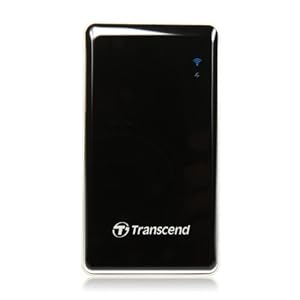
Now, this morning, I saw my first solid state (as in "no moving parts") wireless hard drive, the Transcend StoreJet Cloud:
Image Source: http://www.amazon.com/Transcend-TS64GSJC10K-Information-Storejet-Cloud/dp/B006L42TL2/ref=sr_1_2?ie=UTF8&qid=1352461300&sr=8-2&keywords=storejet+cloud
 
The storage capacity isn't huge (64 Gb), but not bad, either. This device is marketed for use in taking all of your music and videos with you when you travel. I want to turn it around, and use it to back-up the photos I take while I'm out. I need a demo to convince me that's possible.
 
(Click Here) to see the Storejet Cloud on Amazon
 
The process I'm considering at this point is to continue to use the Apple card adapter to transfer images from my SD card to the iPad, then back it up wirelessly to something like the Storejet Cloud.
 
Then, I see this:
 
Image Source: ephotozine.com
 
(Click Here) to read about the card on ephotozine.com.
 
This is a Wi-Fi enabled SD card, which is designed specifically for use with iPad (iOS) or Android devices. If it works as I envision, I can upload directly to the iPad without the Apple adapter. I'm sure it will be slower, but it even has a mode where it will do it as I'm shooting. Now, if that ever negatively affected my shooting, it would be turned off forever. But, think how great it would be to have a backup of everything you shoot being made as you shoot, through a direct wireless connection between your camera's SD card and the iPad in your camera bag. That would be cool.
 
I don't know if it works that way.
 
Also, one more question - if I bought the StoreJet Cloud and the Wi-Fi SD, could I have the card make copies to both the iPad and the wireless hard drive at the same time? Ideally, I could save a jpeg version to my iPad, and both raw and jpeg to the hard drive.
 
Tough customer, aren't I? If this worked, I'd buy both the card and hard drive today. I think the chances of all the integration points working is very slim.
 
Note to Transcend: You now have all the pieces. Make it happen for me.
 
DMC-365.blogspot.com


Thursday, April 12, 2012

Hey Mister, What's in the Bag? Or, What I Took on My Spring Vacation

So, I got into Micro 4/3 camera gear in large part due to the compactness of the system. I used to carry around a very heavy bag of Nikon gear, which consisted of one body and a few lenses, flash, etc. Because I didn't want to be changing lenses in the field all the time, and could only carry one body, I depended largely on zooms, usually with one fast normal prime along for the ride.
 
So, what has Micro 4/3 done for me in terms of my travel kit? Maybe this will give you an idea:
 
Reed's Travel Kit

My Travel Kit - LowePro CompuTrekker AW,
Giottos MT9241 Tripod, Velbon QHD-41 Mini Ballhead

While this is the same backpack I used with Nikon, what I carry inside, and the resulting weight, is very different. Being able to use a small travel tripod and mini ballhead is an immediate advantage of lightweight camera equipment.

Here's what's inside:


Travel Kit, Exploded

Let's see here:
  • Panasonic Lumix DMC-G3 bodies (2X), batteries (4x)
  • Panasonic Lumix 14-140 f4-5.8 zoom
  • Panasonic Lumix 14mm f2.5
  • Pana-Leica 25mm f1.4 Summilux
  • Pana-Leica 45mm f2.8 Macro-Elmarit
  • Panasonic 46mm filters (2X - 1 Polarizer, 1 3 stop ND)
  • Nissin Di466 flash
  • Panasonic Lumix DMC-LX5, batteries (3X)
  • Panasonic Lumix DMC-TS3 waterproof camera, batteries (2X)
  • LowePro Messenger Bag (fits inside Computrekker AW)
  • Mountainsmith Camera Cube (padded divider pack, fits inside messenger bag)
  • Panasonic remote shutter release
  • Apple iPad2
  • Shutterhat camera rain protector
  • Hakuba mini-tripod
  • SD cards, pen and paper, passports, etc.
All of this together, including the Giottos tripod, weighs in at 19 lbs. I don't have a weight for the Nikon pack, but imagine it's quite a bit more.

While this pack is not exactly lightweight, there is significant capability and redundancy here. For a big, expensive trip, that's what I want. Having two interchangeable lens bodies makes me much more comfortable. Not only that, it allows me to shoot mostly with primes, which I really prefer. I found on this trip that I kept the 25mm Summilux on one of the G3s, and alternated between the 14mm and 45mm on the other. I only used the zoom a couple of times, when I wanted longer reach than the 45mm would afford.

What would I leave out if I were going again tomorrow? Not much, actually. I would probably leave out the LX5, but that said, I did use it exclusively for a day of family activities. Yes, I could have used one of the other cameras, but the LX5 sure is a great balance of size and capability. I may leave out the flash. I don't use flash a lot, and they do weigh quite a bit, especially with an extra set of batteries. I might leave out the 14-140 zoom.

The fact that the padded messenger bag fits inside the Computrekker is great. That allows me to only be a packhorse for the whole kit when I'm making major moves between hotels, etc. Once on location, I can put just what I need in the messenger bag, and travel much more lightly.

The DMC-TS3 turned out to be fun on this trip, as I did shoot a few underwater pics. I'll post those in the coming days.

So, I hope you can see that I have a lot more capability with Micro 4/3, at reasonable carrying weight. If I were to limit it to one body, a couple of zooms, and a single fast prime, it would really be a lightweight kit. Sometimes, while my back is aching, I do feel that I challenged myself to fill the volume of the Computrekker.

What do you think? Am I over-prepared for an overseas one week trip? Under-prepared? What would you pack differently? I'm always interested to learn from others.
 
DMC-365.blogspot.com
Tuesday, April 10, 2012

Manipulated Images - "Grunged Japan" by Reed A. George

I warned you - this post contains manipulated images. I just arrived home from Japan. For most of my trip, I had weak or no internet connection, so you can expect to see several posts about Japan now that I'm back and reconnected. On the airplane ride home, I experimented with some fun manipulations of Lumix images I took on the trip, using an iPad app called Snapseed.
 
(Click Here) to find out more about Snapseed.
 
Here are some examples:
 
Grunged Japan #1, by Reed A. George
 
 
Grunged Japan #2, by Reed A. George
 
 
Grunged Japan #3, by Reed A. George

Grunged Japan #4, by Reed A. George

Grunged Japan #5, by Reed A. George

 
Grunged Japan #6, by Reed A. George
 
Now I know these are not my normal images. That's the point. I wanted to do something a little different. Snapseed was just the ticket to accomplish that. I've used a pretty stochastic approach to these, and didn't follow any recipe. They include combinations of "Vintage Film," "Organic Frames," "Center Focus," and "Grunge" (hence the name of the series).
 
They are so manipulated, I think it suffices to say that all are Lumix photographs, taken with either a DMC-G3 or DMC-TS3.
 
Grunged Japan #7, by Reed A. George
 
I hope you don't mind indulging a little break from my normal style with me. I wouldn't want to use these effects every day, but they were a nice little diversion on the flight home.
 
Let me know what you think!
 
DMC-365.blogspot.com

 
Help Support My Blog By Ordering All of Your Amazon Products Here:


Tuesday, April 3, 2012

Now This Could Be Cool - An Online Lumix

 
Net-Connected Camera In The Plans For Panasonic?
Image Source: http://files.petapixel.com/assets/uploads/2012/03/samsung_mini1.jpg

According to a post on PetaPixel, both Samsung and Panasonic are considering adding internet capability to cameras, using the Android operating system.

(Click Here) for the PetaPixel post.

I can imagine that it would be nice to be able to automatically upload images to my flickr account, even while I'm shooting. I can also imagine using my camera to guide me when I get lost. I guess I can even imagine using a bluetooth device to talk on my camera. But, what I can't imagine is that many people will not also have a phone in their pocket while they're out shooting. So, maybe the real usage will be restricted to photo-related tasks?

I also wonder if this would be limited to the Japanese market for Panasonic products? As far as I know, they sell phones in Japan, but I'm not sure if they sell anywhere else. I'm pretty sure Panasonic phones are not available in the US.

Anyway, this is intriguing.

I think I'd rather have wireless connection from my camera to my iPad, honestly. Now that would be cool.

DMC-365.blogspot.com