Showing posts with label computer. Show all posts

Sunday, September 20, 2015

Choosing Tools for Digital Black and White Conversion

Belle of the Plantation, by Reed A. George
Leica M9, Summicron 35mm f2 v.3 Lens
iso 400, f2, 1/60 sec.
 
I like to shoot in black and white. I quite often convert my color digital images to monochrome, to get the look I want.
 
I do have Nik's Silver Efex, which I use as a plug-in for Adobe Lightroom. It has a lot of flexibility, and works very well. More often than not, though, I do the conversion directly in Lightroom.
 
(Click Here) to read a post on Digital Photography School, where they present and compare five different plug-ins: Silver Efex Pro 2, Exposure, Perfect Black and White, B&W Effects 2, and DxO FilmPack. Lots of information to help you decide which plug-in may be best for you, if any.
 
DMC-365.blogspot.com

Monday, August 31, 2015

Going For It - 20 Tb of Hard Drives

So, I decided to go for it and bought a Western Digital EX4100 four-bay Network Attached Storage (NAS) box from Amazon. I got five 4 Tb drives, four for the NAS, one to have an exact-match inside my computer.
 
I will have to be very careful in transferring files from my current disks to the new ones. Last time I did this, I attempted to move the files inside Lightroom, to preserve the connections with the Lightroom catalog. Somewhere in the middle of data transfer, a problem occurred, and I lost some data, and the catalog became corrupt. I finished by moving the files in Windows, then reconnecting the Lightroom catalog later on. That's what I'll do again this time.
 
I think that putting the source and destination drives into the new NAS box, giving them direct connection, will increase my chances of a successful data transfer, as well.
 
I'm looking forward to having a better storage system, that will be logically configured, instead of the one I have now, which grew up over the years. This system will also have plenty of room to grow from here, but in a rational way. The new NAS should arrive tomorrow, so that I can start my gradual upgrade of systems to support all the data I'm producing through my photography.
 
DMC-365.blogspot.com


Saturday, August 29, 2015

Starting to Ruminate on a Major Computer / Software Upgrade

Oh, boy. Can't really believe I'm doing this. But, it's time to get my photo storage and processing more organized.
 
One of the reasons that I still enjoy film photography is that I like physical artifacts - in this case, negatives. I have nicely organized notebook binders for my negatives, and can find any image I want very quickly. To be fair, the digital (scanned) versions that I have in Adobe Lightroom allow me to browse very quickly to even decide which negatives I may be interested in finding again, but that's a different matter.
 
With my digital files, I also have a logical filing system, whereby when I upload from my camera (usually by sticking the memory card in the reader on the front of my computer), I make a folder that's named with a date code (for example, August 20, 2015 is "082015") followed by a brief description of what I shot. For example, if I shot birds on August 20, 2015, the folder would be called "082015_Birds." This naming system would allow me to find most things even without my Lightroom catalog.
 
So, what problem am I trying to solve? Well, first off, I shoot raw files most of the time, which means that I fill up hard disks pretty quickly. This will only get worse as I recently bought a Nikon D810, which produces enormous files.
 
Second, I want to have a real backup (second copy) of every image. I just can't get comfortable with keeping a single copy, even with RAID (redundant array of independent disk) setups. More on that later.
 
So, lots of large files and the need for 100% backup have led me to my current configuration. That is, I have a 2Tb internal drive in my PC, which serves as my primary storage for recently-shot images. This is what I upload to from my camera. It contains all of my images from 2014, and 2015 to date. Then, I have a larger (4 Tb) external drive (Western Digital), connected through USB3. That drive has two main functions - 1) it contains primary copies of all of my earlier images (before 2009 through 2013), and 2) my internal drive mentioned above is automatically backed up to this external drive. So, the external drive is sort of a mix of primary (older) files and backups (copies) of what's on my internal drive. The backups of my older files are on separate hard disks, stored in a drawer (not live).
 
All of this works, but is not very logically-configured. The configuration grew organically, and it shows.
 
So, I'm about to embark on a data storage system improvement. I know that I'll purchase a network attached storage (NAS) device, with at least four hard disk slots. My plan will be to continue to have my most recent images on a larger (4 Tb) internal drive, and have four matching 4 Tb drives in the NAS box. The NAS will not be set up in a RAID configuration, at least not officially. It will be what is called "Just a Bunch of Disks" (JBOD).
 
Here's how I'm planning to configure the NAS:
  • One drive will be dedicated to my older primary files. Backups of these files will continue to be stored on a separate drive, in a drawer (not live).
  • The second drive will be used to automatically back up the internal 4 Tb drive in my computer, which will remain my primary drive for recent files
  • The other two drives will be empty, for now.
So, why have two empty drives? Because that's my plan for the future. Namely, as my internal drive becomes full, I'll need to make a transfer. I'll take drive 2 (the backup of my internal drive) out of the NAS and put it in a drawer for long-term archive. I'll then remove the full internal drive from my computer and put it in the newly-open slot in the NAS. Next, I'll install a new internal drive, and set it up so that slot 3 in the NAS (with a new empty drive in it) is used to back up the new internal drive. I'll be able to continue this through two more iterations before my NAS becomes full. That should be quite a while.
 
I hope this makes sense. I have just decided on how I want it set up, and believe it's safer than any other RAID configuration I've come up with.
 
If one of the disks containing my older files were to fail, I'd just pull a backup drive out of the drawer. If my internal drive (with primary copy of my newest files) fails, I'll have a live backup in the NAS. The only way to lose recent data would be if my internal drive, and the NAS backup were to fail at the same time. That could happen, I suppose (e.g. a fire in my office), but it's pretty unlikely. I also like that the two copies of my recent files will be in two different boxes (one in my computer, one in the NAS). I've had a drive controller fail and ruin two copies at once in the past, and I lost data.
 
I would love to have a way to automatically upload jpeg copies of my images to a cloud storage system. I haven't figured that out yet. I have unlimited storage on flickr, but uploading is a manual and slow process. I'll work that out after setting up my local gear.
 
So, I'll work on cleaning up my data storage first.
 
Next, I'll work on improving my computer speed, as it's pretty darned slow running Lightroom. I'm strongly considering changing from my home copy of Lightroom to using Adobe's new Creative Cloud, which is a subscription model that will get me access to Lightroom and Photoshop for $10 per month. I will also likely need to upgrade my computer, internal memory, and graphics handling, but that all comes later, once my files are in order.
 
DMC-365.blogspot.com

 

Tuesday, July 1, 2014

Lightroom Bogging Down My Computer - THE FIX!!!

Wow. I just have to share this.
 
I've been having a lot of problems with my computer as it relates to using Lightroom. It seems that every time I make even a minor change to an image, or switch from Library to Develop modules, etc., the computer takes off on a disk-writing spree. I mean, it writes non-stop for minutes at a time.
 
Looking for anything that could help, short of buying a new computer (literally), I decided to try a naive google search. Here's what I found. There's a process on Windows computers called wmpnetwk.exe
which enables network sharing for Windows Media Player. Every time I made a change in Lightroom, this process would go crazy, accessing my hard disk.
 
Now, I'm no computer expert. Far from it. But, the link I found was able to guide me through actually seeing this happen with the Windows Resource Monitor. Then, it showed me how to disable the process.
 
(Click Here) to see the original post I found. Be aware that it's from 2008, so I had to sort of find my way around in my later version of Windows.
 
Basically, after confirming that it was the wmpnetwk.exe process that was accessing my disk excessively, I was able to start up a Windows function by pressing the Window Key + r (which gives you a command prompt), then entering Services.msc and hitting go. Within the windwo that came up, I right-clicked the offending process (wmpnetwk.exe) and disabled it.
 
The problem is GONE. Not just minimized, GONE. I'm so impressed. The author of that link deserves a beer.
 
Disclaimer: I can't guarantee that I (or you) won't need that process back sometime in the future. I rarely use Windows Media Player, so I doubt it. But, do this at your own risk.
 
DMC-365.blogspot.com
 

Sunday, February 9, 2014

VSCO Film - Emulate Film or Just Use It?

Discussing the "Elephant in the Room," Smithsonian Natural History Museum
by Reed A. George
Super Ricohflex TLR, Kodak TMax 400 Film
 
I am interested in this concept of emulating the look of film in the digital world. Purists will dismiss it immediately. Others will wonder why you'd want to emulate an old (inferior?) technology. I won't take either stance.
 
I have the full set of NIK software tools (now owned by Google), which allows me to emulate different film looks. I have only really used it to get a Kodak Tri-X look, which I must admit is pretty darned good. But, I find that I rarely use it, even for that.
 
Now there's VSCO Film, another package that seems to go further in emulating specific film emulsions of the past and present.
 
(Click Here) to read a very nice review of the software with lots of examples on the Aperture Priority blog.
 
So, what exactly are my thoughts on this? First, it needs more investigation. I suppose it's possible that sometime during my lifetime film will no longer be available, or will be prohibitively expensive. I hope that doesn't happen, but if it does, this type of software may be more interesting to me.
 
One thing that the blog post above mentions is that while the look is in some cases very representative of the target films, it isn't really film. You don't get that same anticipation of waiting to see what you get back from the processor. For me, that is a factor. I love opening up my envelope and seeing the negatives, then magically turning them into real pictures on my scanner.
 
But, there's another thing. It's the cameras. My film cameras are simply more enjoyable to use than their digital counterparts. That gap is starting to close, though. My Leica M9 could suffice if film were to go away altogether. The new Nikon Df seems like it has similar potential for me. I have yet to see a Micro 4/3 camera that even approaches the feel of a great film camera. My latest, the Panasonic Lumix DMC-GX7 isn't even close in this category.
 
But, I'm not dismissing the concept of shooting digital and emulating film. I'm quite happy to continue to shoot film, but can certainly understand how not everyone feels this way. First off, it's becoming expensive. Next, film and processing are getting harder to find. I'm very pleased with using The Darkroom (thedarkroom.com) for my processing, so it's not an issue for now. But, I'm not prescribing shooting film for anyone else.
 
For now, I'm happy to use film, rather than emulating it.
 
DMC-365.blogspot.com


Wednesday, March 6, 2013

DMC-LX7 Shot - The New Generation

 
The New Generation, by Reed A. George
Panasonic Lumix DMC-LX7
iso 400, f2, 1/60 sec
 
This is just a fun grab shot, taken in my living room. That's my kid, simultaneously working on a laptop and an iPad.
 
This is exactly why I like to have a camera handy at all times. This wasn't posed, just a moment captured over the weekend.
 
I processed this one from the raw image, and I must say I'm pretty happy with it. For iso 400 on a small sensor, I think it turned out pretty well.
 
My daughter likes it too. In fact, she took a print of it to school to put in her locker.
 
DMC-365.blogspot.com
 

Friday, November 30, 2012

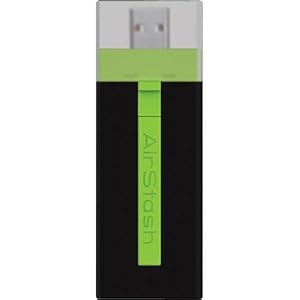
Well, the Seagate Go Flex Didn't Solve My iPad Photo Back-Up Challenge, Maybe The Maxell Airstash Will...

 
The Maxell Airstash
Image Source: http://www.amazon.com/Maxell-AirStash-Expandable-Capacity-Wireless/dp/B006473T92/ref=sr_1_2?ie=UTF8&qid=1354189519&sr=8-2&keywords=maxell+airstash
 
As I mentioned yesterday, the promising combination of the PhotoSmith app and the Seagate Go Flex wireless hard drive let me down, in that they no longer allow you to write files from the iPad to the drive. This is obviously critical for the iPad to be a great back-up tool for photographers.
 
Here's my next attempt - the Maxell Airstash. This is a different approach, which allows you to connect an SD card to your iPad wirelessly. The description clearly states that the iPad will write files to the SD card. I sure hope it's true.
 
With the Airstash, my plan will be to carry a lot of SD cards of matched size. I'll shoot with one in my camera, then use the iPad to copy all of the files to both the iPad and to a second SD card. That's significant back-up (three copies).
 
Here's some of the pluses of this approach:
  • Solid State (SD Card) media
  • No moving parts
  • Fast read and write speeds
  • Easy to carry a lot of data in the form of SD cards
  • Does not rely on using the PhotoSmith app, which I have found to be less than 100% reliable
  • Easy to upload when I do get home. Just grab one copy on SD card and pop it in the desktop card reader.
Here are some negatives:
  • Solid State (SD Card) media - low storage capacity (per card) compared to the 500 Mb Go Flex
  • Wireless - I would be happier if I simply had the ability to write to an SD card from the iPad, using the Apple Camera Connect Kit. It would be faster. I simply don't need wireless for this application. However, I may use it for other things in the future.
  • Internal rechargeable battery - will have a limited lifetime. I wouldn't mind plugging in to AC, or better yet, have it powered from a USB connection.
  • Since you can't easily delete photos from the iPad without connecting to a host computer, I'm still limited in overall capacity to what's on the iPad (64 Gb max).
I'm returning the Go Flex, and have ordered the Airstash. I'll let you know how it goes. If this doesn't work, I will seriously consider the Macbook Air with 256 Gb storage. I'd still much rather have the iPad be my solution.
Let's hope the Airstash lives up to the marketing info.
 
 
DMC-365.blogspot.com


Wednesday, November 7, 2012

Before and After - Some Fun With Snapseed

Here's a rather pedestrian shot of an old telephone pole that I recently took in New Hampshire.
Before - Old Telephone Pole, by Reed A. George
Panasonic Lumix DMC-G3, Lumix 14-140mm f4-5.8
iso 200, f8, 1/125 sec
 
I really like the details in the pole, and the old wires hanging down. But, it was literally in the middle of a swamp, and I couldn't get a better perspective on it.
 
I decided to play with the image in Snapseed on my iPad.
 
(Click Here) for info on the mobile version of Snapseed.
 
Anyway, I did a few things to the image in Snapseed. First, I converted it to black and white, then, I used the tilt and shift function to restrict focus to the center of the pole, then I applied some "grunge," and finally an organic frame and a little grain. Here's the result:
 
After - Disconnected, by Reed A. George
Panasonic Lumix DMC-G3, Lumix 14-140mm f4-5.8
iso 200, f8, 1/125 sec
Manipulated in Snapseed
 
I don't always go for manipulated images. And, I absolutely hate working at the computer as compared to being out using my camera. However, in this case, I think a few minutes on the iPad absolutely transformed this from a boring image to something at least a little intriguing.
 
All things in moderation, I suppose.
 
DMC-365.blogspot.com