Showing posts with label Apple. Show all posts

Thursday, October 26, 2017

7 Day Black & White Challenge


My friend and co-worker nominated me to take part in a photo challenge on facebook, specifically, a 7-day black and white challenge.  The images are to be presented without words or description, and should not include people as subjects.

(Click Here) to see the challenge.

I’ve shown my results for days 1-4 above, all shot with either my iPhone SE or iPad Air.

Great fun, so far.

UPDATE:  Here's the final three


Dmc-365.blogspot.com

Tuesday, November 24, 2015

Just for Fun

I think it's pretty cool that my writing table at Peet's Coffee is an old bowling alley lane.
 
Shot with my Apple iPad Air.
 
DMC-365.blogspot.com


Tuesday, October 6, 2015

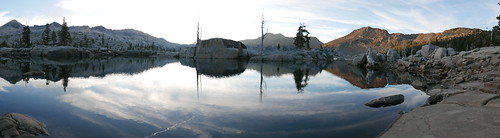
Panorama

 
Aloha Lake, Desolation Wilderness, by Reed A. George
 
The iPhone does an incredible job with panoramas. Click on it to see the detail.
 
DMC-365.blogspot.com


Sunday, July 5, 2015

Did You Get a Release for That?

Model releases can be very important for certain types of photography. I didn't get a release for this shot, as I'm not inclined to sue myself for posting a picture of my kid. But, you get the point.
 
I've actually been waiting to see an iPhone app that takes care of model releases for the mobile photographer. And, it's here. This app from Snapwire not only allows you to get signatures on the fly, on your phone, it integrates with several other applications, including Dropbox and Evernote (my choice of document organization tools).
 
(Click Here) to read about the app on DIYPhotography.net
 
 
DMC-365.blogspot.com


Sunday, September 21, 2014

Travel Day - Made it to Provincetown for Magnum Days

Today was a travel day. It started at 5:30AM at home in Virginia. Left home at 6:30 to drive into DC for a flight out of Reagan National. Arrived in Boston, Logan a little before noon, got my rental car, and drove 2 1/2 hours Provincetown, Massachussetts for the Magnum Days workshop at the Fine Arts Work Center.
 
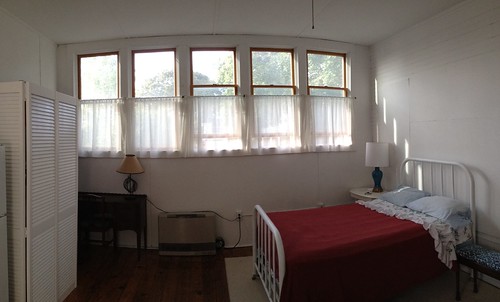
After meeting up with my Boston friends James and Maria, who happened to be in Provincetown for a getaway, I got checked into my room. Perfect. Here's what it looks like:
 
Provincetown Room, by Reed A. George
Apple iPhone, Pano setting
 
Sorry for the iPhone pic, but it actually did a nice job of it.
 
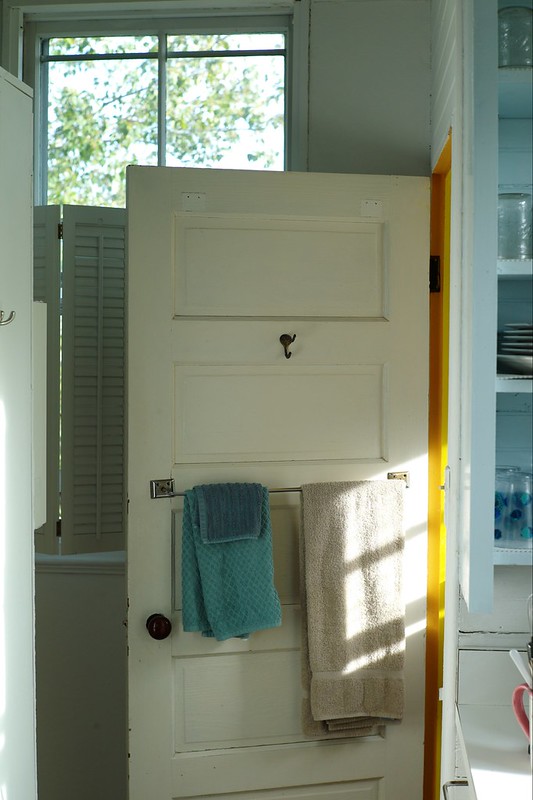
I've read that the light out here on the Cape is special. Well, judging from the afternoon light coming through my bathroom window, I think it may be true...
 
Afternoon Light, by Reed A. George
Leica M9, 50mm f1.4 Summilux
iso 200, f5, 1/125 sec.
 

Don't forget my delay in posting; by the time this posts, I'll be back in Virginia, hopefully with lots of new ideas, techniques, and creative directions! I'll post every day while I'm here, even though they have a very busy schedule planned for us.

DMC-365.blogspot.com


Monday, December 9, 2013

Backing Up Files on iPad - One Step Closer - My Travel Backup System

 
Pogoplug Series 4 Sharing Device
Image Source: http://www.adorama.com/COCPOGOV4A3.html?EmailPrice=T


I've gone through several devices looking for the best way to backup files during travel with my Apple iPad (not requiring me to carry a laptop computer). I was looking for a way to backup raw files and jpegs, even when I may not have access to the internet. I tried multiple wireless hard disks that were advertised as having the ability to move files from the iPad; none of them worked.
 
What I've been doing in the face of this failure is basically making sure I have two copies of every file in a very basic way. I always carry enough SD cards that I don't have to format them during my travel. After filling one up (or after a day of shooting), I use the Apple Camera Connect kit to plug the SD into the iPad and transfer files. This gives me tens of Gigabytes of backup, and the iPad automatically moves both raw and jpeg files. Then, I put the SD away in a different case, so that I remember it's full. Now I have one copy on the SD, and one on the iPad, without the need for an internet connection.
 
Once I'm connected to the internet again, I can upload files to flickr, but that's pretty darned slow in my experience. That's where this little beauty comes in. The Pogoplug is a network file sharing device that you plug in to your network at home. Then, you connect storage to it - this can be anything from an SD card, to a USB hard drive (USB3 that is), or directly connect a hard drive that has the 2.5" SATA interface. I had a 1Tb Iomega USB drive that I connected for now. It gives you a dedicated connection, which makes it much faster than uploading to flickr.
 
So, once you've got that going, you download the Pogoplug app for the iPad (from the Apple App Store). It's free. You can set it up so that anytime you're connected to the internet and the app is open (yes, it must be open), the system will automatically backup your jpeg files from your iPad Camera Roll to the hard drive at home, no matter where you are. This is handy, especially if you use a wifi-enabled camera (like my Panasonic Lumix DMC-GX7 or Lumix DMC-TS5) to upload to the iPad. Then it's all seamless.
 
Here's the limitation - both Lumix wifi and Pogoplug are limited to only jpegs - they won't upload raw files.
 
So, my workaround (assuming I need to backup raw files) is this - I don't use wifi to transfer from the camera to the iPad, but use the Apple Camera Connect as stated above to get a second copy of my jpegs and raw files onto the iPad. Then, the Pogoplug app requires that I go in and select the images in my Imported folder on the iPad for upload to the disk at home. Easy, and quite fast. It will be even faster when I get a dedicated hard drive directly connected to the Pogoplug.
 
So, what does this give me? Two copies of all files, and a third of the jpegs only:
 
  1. The original raw and jpeg files stored on the SD card I used in the camera.
  2. Second copies of both raw and jpeg files imported to the iPad (using the Apple Camera Connect kit).
  3. Third copies of jpegs only backed up on the Pogoplug hard drive at home. These would save me if I dropped my camera bag and iPad into the ocean or something.
This means I have to carry a lot of SD cards, but they're small, lightweight, highly reliable, and relatively low cost.
 
I don't like that the Pogoplug app will only copy jpegs, but the silver lining is that upload of jpegs is very fast. Maybe they'll add raw capability in a firmware upgrade. Wouldn't that be great?
 
The Pogoplug adapter is very inexpensive. Purchase yours at the link below.
 
DMC-365.blogspot.com


Saturday, June 29, 2013

Over - A Nice App For Adding Text to Images on iPad

 
Just Playing Around
 
You know how Starbucks has those little cards giving away a free App or song each week? This week's App in my local store is called "Over." Over is an image editing program, which allows you to add text or art to your pictures. Pretty darned cool.
 
I downloaded Over from the App store, and played around a little with it, just using images that were already on my iPad. This is a very simple way to add text to your images. I'm thinking of making electronic postcards from your beach vacation, for example. Here's a hint: once you've added text and hit "Done," use the yellow arrow on the right of the screen to find options for how to modify it. The options that come up are on a wheel, which you can spin for more options. I'm sure this doesn't make sense, but it will once you open the App. Finding the wheel is necessary to be able to save your image, for example.
 
Here's another image I played around with:
 
Could Be Useful
 
Hmm. No bad for the price (free).
 
DMC-365.blogspot.com


Wednesday, June 26, 2013

This Might Be A Fun Little Gadget - The Kick by Photojojo

 
Photojojo is marketing "The Kick," an LED light array, complete with an iOS (iPhone, iPad, iPod Touch) app. You can use it to light photographic scenes, either attached to your iPhone, or remotely. It even has a tripod mount so you can stably mount it just about anywhere.
 
The Kick provides constant light (not strobe), and has the following features:
 
  • Color balance via the app (2,500 - 10,000 K)
  • Intensity control
  • Tripod mount
  • Rechargeable Li ion battery (charge with USB)
  • Ability to sample light and mimic color balance with the LEDs
There are some pretty cool example shots on the website.
 
(Click Here) to investigate The Kick on Photojojo
 
Cute. $179 cute? Hmm. That seems like a lot. Probably not buying one this week.
 
DMC-365.blogspot.com


Monday, December 3, 2012

Got An Old DSLR Gathering Dust? Help Out A Great School

 
The Duke Ellington School of the Arts
Image Source: http://www.ellingtonschool.org/home/index.html
 
My friend and fellow DC-area photographer, Aboud Dweck, is teaching photography at the Duke Ellington School of the Arts in Washington DC. They desperately need DSLRs (of any functional variety) and Apple computers.
 
(Click Here) to read Aboud's post on GetDPI.
 
I have walked by this school before, and can tell that it's something different. The students seem engaged in life. There's an ENORMOUS wooden chair outside, that I think 15 kids could sit in at once.
 
Anyway, if you can help them out, please do. I'm going to see if the old iMac I have could be of any use, but it's probably too old... Maybe I'll have to pick up a D70 for cheap and donate it.
 
Support the future of your art.
 
You can contact Aboud at dweckphoto@gmail.com
 
DMC-365.blogspot.com
 

Friday, November 30, 2012

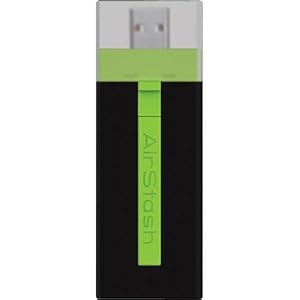
More Unfulfilled Promise - the Maxell Airstash

 
Maxell Airstash
Image Source: http://www.amazon.com/Maxell-AirStash-Expandable-Capacity-Wireless/dp/B006473T92/ref=sr_1_2?ie=UTF8&qid=1354189519&sr=8-2&keywords=maxell+airstash
 
So close, but yet so far. Let me save you some reading if you like: AIRSTASH DOES NOT ALLOW TRANSFER OF RAW FILES FROM THE IPAD.
 
My Airstash arrived yesterday, and after a few blips in upgrading the firmware, was ready to go. Very promising. The app (Airstash+) actually has a simple interface. Click the little camera icon, and you can say whether you want to import (from Airstash to iPad) or export (to the Airstash), select your images, and go. So, I did a test with ~250 images stored on the iPad (in both jpeg and raw) during a meeting. I was elated. Within 40 minutes it was done. So cool!
 
The transfer rate was not fast, but certainly acceptable. The devise design is nice - it's very small, light, not much more in your bag than a normal SD card - USB adapter.
 
Then came the final part of the test. Plugging the Airstash into my desktop, I looked at my transferred images. What? No raw files! Just jpegs. The transfer changed all of my raws into jpegs.
 
I thought there must be a setting that I missed. There isn't. In fact, there are so few settings that I scanned all of them three times in a few minutes. So, reluctantly, I called the 24/7 Maxell service line.
 
After a several minute hold, I got a real person. He immediately told me that I'd have to do some internet research, and that this functionality was on the app end, which is produced by a third party. I replied that I had read the MAXELL web page extremely carefully before making this purchase, and that it clearly indicated compatibility with raw files. After pushing back, he agreed to talk with someone else there at Maxell. He came back on the phone after consulting with the Airstash Support Manager, and informed me that the software automatically converts raw files to jpeg upon export to the Airstash. There is nothing you can do to change that. I calmly informed him that this "feature" makes the device completely unhelpful to serious photographers, and it's on its way back. He said "Okay, thank you!" and we were done.
 
A couple of you have suggested divorcing from Apple for this function. I'm afraid I may have to agree with you. I'm so hooked on the iPad interface and apps for other purposes, it is difficult to consider something else. But, it just won't seem to help me out here.
 
I thought Apple's strongest core of users came from the arts, science, and imaging worlds. How can they not see the need to give this to us photographers?
 
I'm going to take a break from this pursuit for a while. I'm not doing any more big travel until spring...
 
DMC-365.blogspot.com


Well, the Seagate Go Flex Didn't Solve My iPad Photo Back-Up Challenge, Maybe The Maxell Airstash Will...

 
The Maxell Airstash
Image Source: http://www.amazon.com/Maxell-AirStash-Expandable-Capacity-Wireless/dp/B006473T92/ref=sr_1_2?ie=UTF8&qid=1354189519&sr=8-2&keywords=maxell+airstash
 
As I mentioned yesterday, the promising combination of the PhotoSmith app and the Seagate Go Flex wireless hard drive let me down, in that they no longer allow you to write files from the iPad to the drive. This is obviously critical for the iPad to be a great back-up tool for photographers.
 
Here's my next attempt - the Maxell Airstash. This is a different approach, which allows you to connect an SD card to your iPad wirelessly. The description clearly states that the iPad will write files to the SD card. I sure hope it's true.
 
With the Airstash, my plan will be to carry a lot of SD cards of matched size. I'll shoot with one in my camera, then use the iPad to copy all of the files to both the iPad and to a second SD card. That's significant back-up (three copies).
 
Here's some of the pluses of this approach:
  • Solid State (SD Card) media
  • No moving parts
  • Fast read and write speeds
  • Easy to carry a lot of data in the form of SD cards
  • Does not rely on using the PhotoSmith app, which I have found to be less than 100% reliable
  • Easy to upload when I do get home. Just grab one copy on SD card and pop it in the desktop card reader.
Here are some negatives:
  • Solid State (SD Card) media - low storage capacity (per card) compared to the 500 Mb Go Flex
  • Wireless - I would be happier if I simply had the ability to write to an SD card from the iPad, using the Apple Camera Connect Kit. It would be faster. I simply don't need wireless for this application. However, I may use it for other things in the future.
  • Internal rechargeable battery - will have a limited lifetime. I wouldn't mind plugging in to AC, or better yet, have it powered from a USB connection.
  • Since you can't easily delete photos from the iPad without connecting to a host computer, I'm still limited in overall capacity to what's on the iPad (64 Gb max).
I'm returning the Go Flex, and have ordered the Airstash. I'll let you know how it goes. If this doesn't work, I will seriously consider the Macbook Air with 256 Gb storage. I'd still much rather have the iPad be my solution.
Let's hope the Airstash lives up to the marketing info.
 
 
DMC-365.blogspot.com


Thursday, November 29, 2012

Not Quite Ready for Photography Back-up Perfection - the iPad

Apple iPad 2
Image Source: http://www.apple.com/ipad/compare/
 
So, I've been using an Apple iPad for so many things in life recently. I really love the device, and it goes everywhere with me - mainly for work, but at home and on travel as well.
 
My meeting notes and plans are so much better organized than in the past, and always with me. The app Evernote has made that happen for me. But, you're here to read about photography...
 
I've been using the iPad for photo backup on travel. The Apple Camera Connect Kit ($29) allows me to transfer fiiles from an SD card (from the camera) to the iPad. That's great. Here are the current limitations:
 
  1. Limited storage (64 Gb total) on the iPad.
  2. The iPad will only upload photos into its own photo app.
  3. No way to export to a hard drive to have a second copy of the files.
  4. Limited capability in apps to organize, rate, and store photos.
On the positive side, if you have access to the internet, with LOTS of bandwidth (more than most hotels offer), you can use the iPad to upload photos for backup. One great solution for this is flickr, which allows you to upload (and hide if you wish) unlimited jpegs for $25 per year. The only drawback there is that you can't backup your raw files. But, it's sure a nice way to have at least your jpegs safely copied online.
If you don't have internet access, options are quite limited. What I've been doing is copying files from my SD cards to the iPad, AND keeping them on the SD card as well. This is not a bad solution, as SD cards are quite inexpensive now, and it's easy to carry a lot of memory in a very small volume. But, once I reach 64 Mb (which includes all of my applications and documents on the iPad), I'm kind of stuck.
 
I thought I had a fix recently. I purchased a book specifically about the iPad for photographers. I won't list it here, because the fact that it's already out of date is causing me problems. I can't recommend the book to my readers. Anyway, at one point in time, the photo app PhotoSmith (www.photosmithapp.com) had the capability of sending photos to a compact wireless hard disk from Seagate.
 
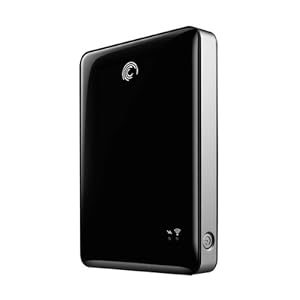
Seagate Go Flex 500 Gb Wireless Hard Disk
Image Source: http://www.amazon.com/Seagate-Satellite-Wireless-External-STBF500101/dp/B004Z0S7K6/ref=sr_1_1?ie=UTF8&qid=1354106017&sr=8-1&keywords=seagate+goflex
 
This drive is on sale for the reasonable price of $99 right now. So, I bought one. Guess what? It no longer connects with PhotoSmith. According to PhotoSmith Technical Support, that's because of some issues on the Seagate side, and they hope to fix it soon. But for now, it won't allow me to move photos from the iPad to the Go Flex.
 
Now, about the Go Flex. It's pretty cool. If you want to load up an enormous amount of video, photos, music, etc. for a trip (loading from a PC with USB), you can share all of that wirelessly to up to three devices (including iPads). So, you can keep the whole family happy with movies for a long drive. But, you can't move anything from the iPad to the Go Flex at this point. So, it doesn't solve my backup problem.
 
Another exciting development is the Kingston solid state wireless drive. That's a topic for a later post, as I haven't fully investigated it yet. However, at this time, I believe it has the same issue with transferring files from the iPad. Once this is solved, either device will be a killer solution.
 
A quick note on the PhotoSmith app. It's pretty good in most ways. It allows me to import photos from the Apple photo app to PhotoSmith (both on the iPad). Once I've done that, I can sort, rank, and flag my files, just like I do in Lightroom at home. And, there's a publish plug-in for Lightroom that allows me to transfer those files wirelessly once I get home, directly into Lightroom on my desktop machine, ratings and all. Now, this is not seamless. It has limitations. I've had a hard time getting ALL of my photos to transfer, and you don't have much flexibility in deciding where they transfer to on your desktop (they go in a PhotoSmith directory in MyPhotos on the PC, which is not where I want them). Overall, I give PhotoSmith 3 out of 5 stars. I'm sure it will improve.
 
I really love the iPad, and think the iPad Mini could be the right solution for travel photography backup, once it can send files to an external drive (by the way, that doesn't need to be wireless for me; a wired drive would be fine).
 
So, all of this leaves me thinking - what about just going to the Apple MacBook Air? I could carry a 256 Gb Air and a normal USB drive, and instantly have two copies of my photos, and free up my SD cards to be reformatted. And, if I have internet connectivity, it's even better. The Air is more expensive. It also lacks the nice touch screen interface of the iPad. I'd much rather solve the few remaining issues with the iPad and maybe go to the mini.
 
So, there's a quick update on the status of the iPad for photographers, as I see it. If others have found nice solutions, please let me know.
 
DMC-365.blogspot.com


Thursday, September 27, 2012

Well, Here's a Funny Twist... Impossible? Yes. The Impossible Project, That Is.

Finally analog instant photos from your favorite digital images!
 
The Impossible Project's Instant Lab
Image Source: http://www.kickstarter.com/projects/impossible/impossible-instant-lab-turn-iphone-images-into-rea
 
So let me get this right. People want to snap pictures on their iPhones and turn them into Polaroid-style instant prints? Apparently so.
 
(Click Here) to read more.
 
This gadget allows you to shoot with your iPhone camera, bring the image up on your display, then lay it on top, expose instant film below, and print. I have to admit, I don't get it.
 
First off, I'm not an iPhone user (crowd gasps)...
 
I can understand why you'd want to be able to give iPhone pics to your friends. Here are a couple of things I don't understand:
  1. They're digital pictures - can't you give them all to your iPhone-carrying friends digitally? Of course you can.
  2. If someone wants to give ME one (without an iPhone), they can email it. I do have that.
  3. Let's say I just love to have photos on real paper - wouldn't I rather print it out directly? Something like this?
(Click Here) to see the Polaroid instant printer for iPhones, as reported by Chase Jarvis.
 
Why in the world would I want it to go through the instant film process and cost?
 
I've been wrong about things like this before. But I think this appeals to the very rare person who loves analog prints, along with the very analog process of making a Polaroid print, yet loves digital technology, and uses an iPhone camera. I'm in the first class of people, who still love analog photography. But, I just shoot with an analog camera. I can't imagine wanting the convenience of shooting with an iPhone (which is considerable), and still planning to carry the Instant Lab with me to make prints for my friends. So I can carry the iPhone in my pocket, pull it out and shoot anytime - that's cool. What, I also wear a backpack with my Instant Lab and pack film, sit down, expose, and wait a few minutes for a print of an image that's gone through the lossy process of exposing an LCD representation onto instant film? And have yet another battery to charge? Unlikely. Impossible? Well, that's their name.
 
I think these guys are very creative. I love that they're around. I love the idea that instant film is still available. I don't get why 8X10 film is available, while 4X5 is not. But, I'm sure there's a good reason.
 
Keeping working on it, Impossible. I'd almost buy one just to keep your creative gears turning.
 
DMC-365.blogspot.com