Showing posts with label conversion. Show all posts

Sunday, September 20, 2015

Choosing Tools for Digital Black and White Conversion

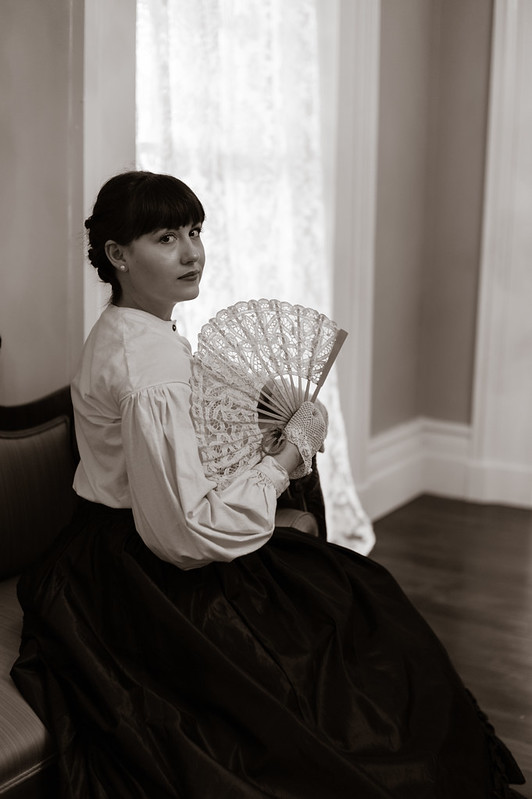
Belle of the Plantation, by Reed A. George
Leica M9, Summicron 35mm f2 v.3 Lens
iso 400, f2, 1/60 sec.
 
I like to shoot in black and white. I quite often convert my color digital images to monochrome, to get the look I want.
 
I do have Nik's Silver Efex, which I use as a plug-in for Adobe Lightroom. It has a lot of flexibility, and works very well. More often than not, though, I do the conversion directly in Lightroom.
 
(Click Here) to read a post on Digital Photography School, where they present and compare five different plug-ins: Silver Efex Pro 2, Exposure, Perfect Black and White, B&W Effects 2, and DxO FilmPack. Lots of information to help you decide which plug-in may be best for you, if any.
 
DMC-365.blogspot.com

Tuesday, June 18, 2013

Low Tech Wonders - Converted Polaroid 103 Images

 
I wrote a little about my Polaroid 103 camera, rescued from a dusty shelf in an antique shop, some time back. (Click Here) to read about how I got it going again.
 
Since then, I've also tweaked the "electronic eye," adding a handmade paper diaphragm (a hole punched in a piece of paper) to reduce the light coming in. I found that it was underexposing, even with the exposure adjustment all the way toward the bright side. The paper aperture fixed it, and it shoots just about right with no exposure offset.
 
So, I bribed the kid - sure, you can have a piece of cake after dinner, if you come outside and let me shoot pictures of you as you eat. Here are the results, scanned on my Epson V750:
Oops, a little motion blur. Here's my favorite from this series:
 
She said "It looks like I'm summoning lightning." I agree.
 
And here's the most artistic shot I've made with the 103 so far:
 
It's actually a very capable camera.
 
One thing that's interesting - there are two types of Fuji pack film that are available and work in the camera (see links below). One is iso 100 color, which you see used in all the images above. The other is iso 3000 (!) black and white. Here's the funny thing. Since the camera is fully automatic, you can't change the exposure. Apparently, it uses a much smaller aperture for the black and white, making it shoot at approximiately the same shutter speed as the iso 100 film. I thought I should be able to make great low light images with iso 3000 black and white film. Not so. Indoors, because the aperture is small, the shutter speed is quite long, even with iso 3000.
 
Anyway, I'm glad my Mom sent me the Polaroid. It is a nice diversion.
 
DMC-365.blogspot.com


Thursday, December 6, 2012

Getting That Film Look From Digital - Theme Presents a Nice Summary of Software Options

 
Black and White Conversion Done in Lightroom
 
It's pretty interesting how there seems to be a persistent interest in shooting film, or at least getting results that look like film. I started this morning's blog story search with an article on Theme about how some photographers (I won't say "many"), including some pros, are sticking with film.
 
(Click Here) to read how some pros are continuing to shoot with film.
 
That led me to another article on Theme, about using software to make your digital images look like film. In this piece, they cover five optional add-ons to your normal photo editing software (Adobe Lightroom in my case):
 
  1. DxO FilmPack
  2. Alien Skin Exposure 4
  3. Nik Silver Efex Pro 2 (for black and white)
  4. Nik Color Efex Pro 4 (for color)
  5. TrueGrain (specifically for grain effects)
(Click Here) to read the whole piece on Theme.
 
The article describes how Sebastiao Salgado refused to switch to digital until he could recreate the look he's always gotten with black and white film (Kodak TriX 400). Now that he's switched, he processes his images with DxO FilmPack, and even transfers them to a film base digitally.
 
Both DxO and Nik have free evaluation versions. Theme suggests that DxO is less expensive, and does the job very well.
 
Personally, I don't like spending time editing images, but do a fair amount of conversion to black and white. I have been doing it all within Lightroom, which allows me to save presets. However, I'm interested in finding out what I've been missing with one of these other packages.
 
I'm tempted to try DxO. However, I already have Nik's excellent HDR Pro software for high dynamic range imaging, so I may try Silver Efex. Maybe I'll try to do this over the holidays. I'll report back after I've had a chance to play a little.
 
Of course, I continue to shoot film as well. I see no reason to be exclusive in my approaches.
 
DMC-365.blogspot.com