Showing posts with label Printing. Show all posts

Saturday, September 12, 2015

I Want to be a Better Printer, Too!

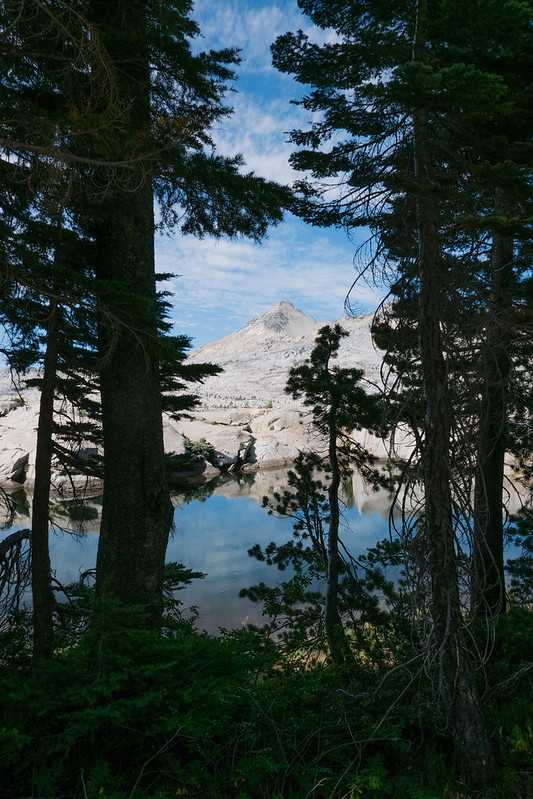
Alpine Lake and Shadows, by Reed A. George
 
I just read a post by Pascal on the blog Dear Susan, about how he really wants to become a better printer. Importantly, Pascal interviews Ctein, a master printer, to get some advice. Ctein's best advice is to go ahead and print your image once you think you have it close on the monitor. It won't print the same, but don't worry about that. Live with the print a while, making notes on it where and how you want to improve it. Don't focus on how it looks on the monitor any more; make the changes that will improve the print. Over time, you'll learn how to do this more automatically.
 
Okay. I can give that a try. Simple - no big focus on calibration, paper types, lighting, etc. Just print, live with it, adjust it for the paper instead of the monitor.
 
(Click Here) to read the full post on Dear Susan.
 
DMC-365.blogspot.com

Saturday, July 18, 2015

Impossible Project Magazine - Rooster Brennan Documents African Safari with Instant Film

I am still thinking about how equipment and creativity interact to tell a story. Just yesterday, I met with my photographic friends and mentors, and got some feedback on the Smithsonian Folklife Festival images that I've been posting here recently. I got comments ranging from something like "See, if you control the background, you can't tell that these shots weren't made in Lima, Peru, as opposed to DC," which I loved, to "Not really sharp. That's the problem with flatbed scanning of 35mm film." All of the comments were useful to me, and were correct.
 
So, how does one share an African safari on instant film?
 
 
Well, you can check out the Impossible Project's magazine to see how Rooster Brennan did it, using the Impossible Lab to print his images on instant film. The article focuses on storytelling, more than equipment. I think he's done a fine job. (Click Here) to read the story and see the pictures.
 
I think that I still need to work on my storytelling with pictures. If the storytelling were strong enough, the technical details would become much less important. That's my goal.
 
DMC-365.blogspot.com

Sunday, May 13, 2012

Jetpack Photography - Kirk Tuck's Take on Film and Digital

Personal Jetpack
Image Source:
http://io9.com/5029930/five-reasons-you-dont-have-a-personal-jet-pack-yet
 
Kirk Tuck has written a thought provoking piece about the controversy regarding how digital has affected photography. This is no nostalgic piece about how he longs for the good old days. It uses the analogy of competitive swimmers with jetpacks, and how, once they're allowed in the sport, no one can swim without one any more.
 
(Click Here) to read Kirk's piece on visualsciencelab.
 
I like many of the points that Kirk makes. I can admit two things in regard to this piece. First, I have a very hard time making myself slow down and think with a whiz-bang camera in my hands. I'm getting better. The Leica M8 is probably the best thing to happen to help me in that area. With that (wonderful) camera, I have to take my time, because it takes so long to write an image to the card that you better not miss the moment. But, seriously, the manual controls, manual focus probably being the most important, make me feel that I have invested something (if not money for film and processing) into each image.
 
Second, I do find it hard to wade through the piles of crap images that are posted on the web. I can click on through if I don't see something interesting, so no harm done. But, I find that I have to do that a lot.
 
One point that Kirk makes is that most of the famous images and successful collections were shot with film. Personally, I don't think that's a fair statement to make. How many years, how many decades of experience, went into making those film images? Sure, there are more images made every day now than then, so we can't compare the absolute numbers of images easily. But, definitely, the bulk of photographic history did not have digital equipment available to it.
 
I agree with Kirk's point that the equipment affects the photographer. I sure feel different when I'm holding a Lumix G3 than when I'm holding a 4x5 film camera. And, I shoot differently. I also judge other photographers (probably mostly incorrectly) by what they shoot with. Just last night, I met a lady who shoots the same Pentax film SLR that she has used her entire adult life. In my mind, she's a better photographer than her neighbor with an iPhone camera. Again, I'm probably wrong.
 
I prefer to focus my attention on what I like about each technology. Personally, I love the anticipation of getting film processed, when the images are just for my own enjoyment. It's even better when I have to wait to open an envelope filled with big 2 1/4" color transparencies, which have just returned from mail-in processing at Dwayne's.
 
(Click Here) for Dwayne's website. They do great work.
 
With that said, I sure appreciate the ability to experiment with new techniques with digital, see if they're working immediately, and resort to more proven approaches to make sure I get the shot, if not. I love being able to print (either scanned film or digital images) at home. I love having a 32" display, so I can see what a big print would look like, without having to invest in printing it.
 
And, personally, I'd love to have a jetpack.
 
Thanks, Kirk, for some stimulating words.
 
DMC-365.blogspot.com


Saturday, May 12, 2012

Useful Article on Printing Resolution at digitalphotopro.com

 
Table Source: http://www.digitalphotopro.com/technique/workflow/the-right-resolution.html

How do you decide what print resolution to use when printing your digital files? Do you always just set it to 300 dpi and forget it? Just use the native resolution of the image? I have known that you can get by with lower resolution printing for larger images, but didn't really know how to calibrate that. I have also learned the trick of increasing resolution to 360 dpi when I make large prints of smaller resolution images.

(Click Here) to read the whole article, which leads me to somewhat different conclusions.

First off, the table above. This table reinforces the idea that you can get by with lower print resolutions for larger prints. For example, a 3.5" x 5" print is normally viewed from 10-12" distance, meaning about 300 dpi is correct.

However, this article finds that there is benefit in printing to 360 dpi resolution with Epson printers (mine is Epson), 300 dpi for Canon, regardless of final print size. So, conclusion 1 is that you should print at 360 dpi for any print size, even if your file isn't that high in resolution. The article explains how to do this from Lightroom.

The second conclusion is that if your original file is even higher resolution than the Epson native resolution of 360 dpi at the size you want to print, you should NOT decrease the resolution. In fact, you may benefit from increasing the resolution to 720 dpi, if you have an Epson Pro printer, which has a maximum detail resolution of 720 dpi.

This article goes far in demonstrating the differences, yet results in simple conclusions. Very helpful.

DMC-365.blogspot.com