Showing posts with label print. Show all posts

Thursday, October 22, 2015

Halloween's Coming

Pumpkin Time, by Reed A. George
Leica M3, 50mm f2 Summicron Collapsible Lens
Kodak Ultramax 400 Film
Processing and Scanning by The Darkroom (thedarkroom.com)
Manipulated in Snapseed
 
DMC-365.blogspot.com
 

Saturday, September 19, 2015

So, How Is the Nikon D810?

I'm still getting my feet wet with this camera, but check this out:
 
Great Blue Heron, Ardea herodius, by Reed A. George
Nikon D810, Nikkor 200-400mm f4 AF-S VR G Lens
iso 1600, f5, 1/2000 sec.
 
The detail in the print I made of this shot is just stupendous. iso 1600? Not a problem at all.
 
At 6400, I do see image quality start to drop off, but still quite impressive. At 1600, it's lovely.
 
DMC-365.blogspot.com

Saturday, September 12, 2015

I Want to be a Better Printer, Too!

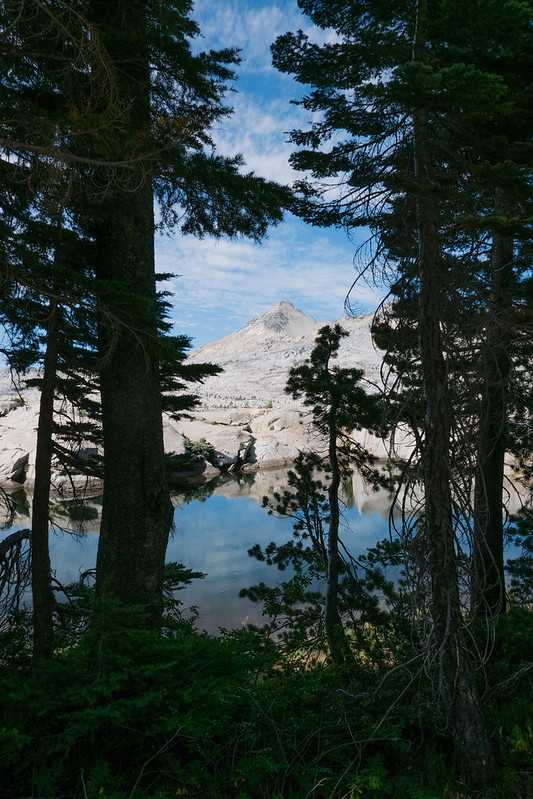
Alpine Lake and Shadows, by Reed A. George
 
I just read a post by Pascal on the blog Dear Susan, about how he really wants to become a better printer. Importantly, Pascal interviews Ctein, a master printer, to get some advice. Ctein's best advice is to go ahead and print your image once you think you have it close on the monitor. It won't print the same, but don't worry about that. Live with the print a while, making notes on it where and how you want to improve it. Don't focus on how it looks on the monitor any more; make the changes that will improve the print. Over time, you'll learn how to do this more automatically.
 
Okay. I can give that a try. Simple - no big focus on calibration, paper types, lighting, etc. Just print, live with it, adjust it for the paper instead of the monitor.
 
(Click Here) to read the full post on Dear Susan.
 
DMC-365.blogspot.com

Friday, November 14, 2014

Found Prints - Two Shots of a Soldier at Home, and the Concept of Association

Following on my post two days ago of old pictures I found in my friend's antique shop The Gilded Flea in Harpers Ferry, WV, here are a couple more that drew my interest.
 
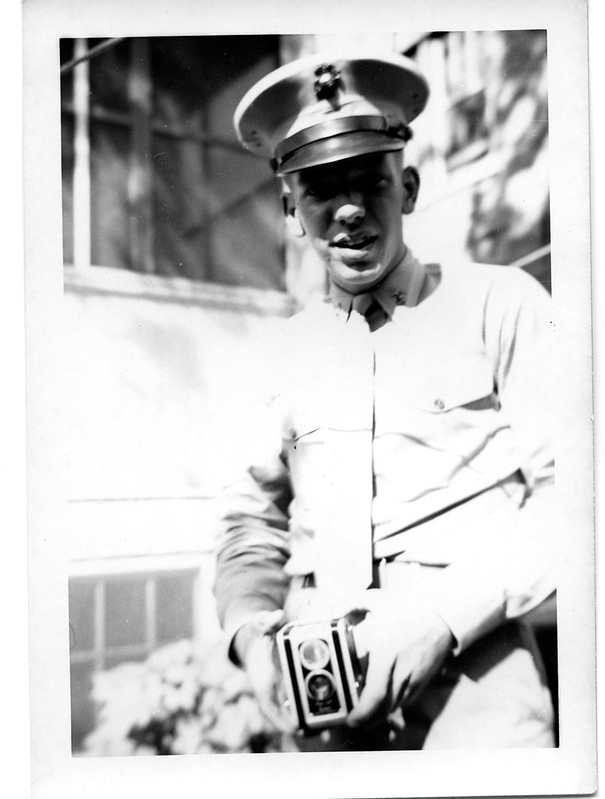
Of course, any picture of someone with a camera from back in the day interests me:
 
Soldier With His Camera
 
I believe that's probably a Kodak Duaflex, but can't be sure.
 
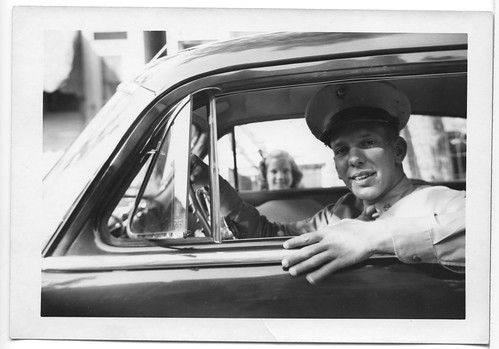
Here's another picture of the same young soldier:
 
Heading Out
 
I sure hope his little sister in the background got to see him again.
 
One thing that strikes me about both these pictures and the ones I posted two days ago is association. I have a close friend who's a Paleontologist. I learned from him the value of finding multiple fossils that are known to have come from the same organism, or sometimes multiple organisms interacting. That's called an association. I submit that association in old photographs is equally important.
 
These pictures would make great starting material for a fictional story. Maybe I'll write one.
 
DMC-365.blogspot.com

Friday, September 26, 2014

Tangible Artifacts of the Photographic Process

 
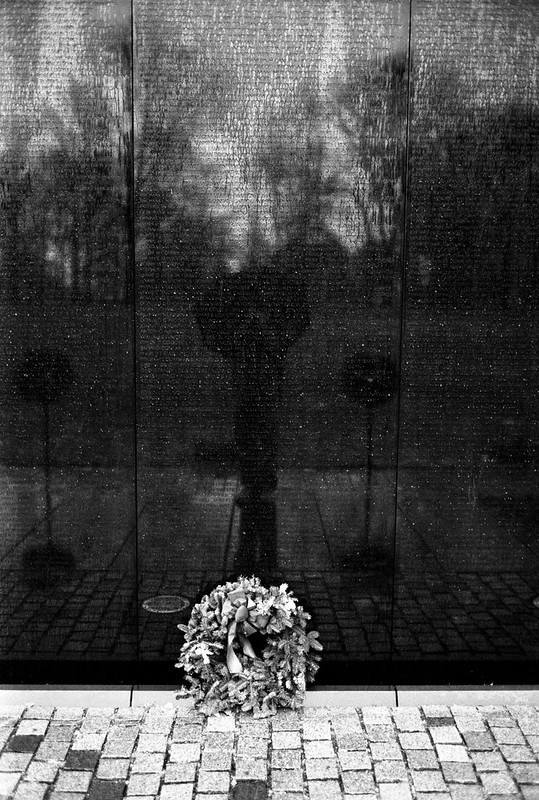
Vietnam Memorial
Leica M4-2, Leica Summicron 35mm f2 v.3 Lens
Kodak TMax 400 Black and White Negative Film
 
One item of some debate at the Magnum workshop was whether or not an image really exists before it is printed on real paper. Magnum legend Costa Manos maintains that the print is a necessary component, that you really don't have an image until you have a print. And his prints are spectacularly made, with such care that you can identify with his point.
 
Not everyone agrees, but no one argues that a fine physical print is a worthy object; it's just a question of whether it's always necessary.
 
Having shot only digital for a full week, I find myself wondering whether one could make the same argument about the negative (or transparency) being a necessary artifact. In fact, this did come up during one of the public talks, where there was some disagreement about whether you'd grab your hard drive on the way out in the event of your house catching fire, as people have done with their family pictures and negatives for many years. I think I would. Or, to argue against the need for a physical negative, perhaps having all of my images backed up to the cloud obviates the need to grab anything on the way out.
 
A final thought is that I have actually lost images in a most unfortunate simultaneous crash of two hard disks (copies of each other). But, I suppose I have also lost most of my earliest negatives, which were shot before I got smart and developed an organized filing system. Those negatives were really lost in the carelessness of youth, not as a result of the medium on which they were stored.
 
So, what do you think? Must it exist in physical form to be a real photograph?
 
DMC-365.blogspot.com


Thursday, June 5, 2014

"Engineer" (Low-Fi Large Format) Prints from Photojojo

I have a couple of images that I want to print very large. I posted one of them yesterday, which I shot at Audubon Park in New Orleans. I have a very large square frame that I rescued from the trash can, waiting for that shot. Another is a pinhole image that I recently made, which I have not yet shared. It's a much less sharp (obviously, having come from a pinhole camera), more interpretive image that I want to print as large as possible to see if the effect scales.
 
Large prints are very expensive to make. At least photographic quality prints. This morning, I found a post about "Engineer" prints from Photojojo.
 
Image Source: http://photojojo.com/engineerprints/img/tutorial_photos/Engineer-Prints-457_Full1600new.jpg
 
These are apparently made on printers designed for architectural drawings, and on rather lightweight paper. They are 3' x 4' in size, and only in black and white. The description includes this statement about what to expect:
 

"Streaked, striated and wacky black and gray tones combine to create a super unique look that’s no ordinary photo print."

 
So, don't expect a perfect print. However, at $25, and with free shipping, it may just be worth a try with my pinhole image. That shot is made on 4x5 film, so I can make a very large scan of it to send for printing. Yes, I think I'll give it a go. I'll let you know how it turns out.
 
(Click Here) to read more about Engineer Prints from Photojojo.
 
DMC-365.blogspot.com


Sunday, April 27, 2014

Continuing the Quest for a High Speed Color Film - Fuji Natura 1600 is Next

I recently tried a new film, CineStill, which lists the ability to push it to very high iso levels as one of its features.
 
(Click Here) to read a little about CineStill. I bought mine from Freestyle.
 
I shot two rolls of CineStill at a house concert, which should have been the perfect test location. I shot it at iso 1600, and asked The Darkroom (thedarkroom.com) to push it one stop in processing. I'm not ready to enter a verdict on CineStill yet, and will write more about that later. Suffice it to say, I don't think I'm done looking for a great color film for low light concert shooting. Once I find one, I will do my best to replicate the look in Lightroom, exactly as I've done for Ilford Delta 3200 for black and white images.
 
On my way to the flight home from Japan, I found five rolls of Fuji Natura 1600 color print film.
 
Fujifilm Natura 1600 Color Print Film
 
At a little less than $10 per roll here in the Tokyo Narita Airport, it's about the same price as CineStill. I'm looking forward to giving Natura a try.
 
If it works well, I'll have a good basis for defining a new color look in Lightroom. That's the possible upside. The possible downside is that I'll fall in love with the film's look; it's essentially not available in the USA at all, as far as I can tell. I saw a couple of questionable-looking ads, at about $20 per roll. I won't be doing that.
 
Anyway, once I've thoroughly evaluated CineStill, I'll post the results. Of course, I'll also post any results I get with Natura. More film fun!
 
Surprisingly, this is the only photographic product I purchased on my trip to Japan. I saw a few interesting products, but nothing good enough to part with my cash.
 
DMC-365.blogspot.com
 

Thursday, August 29, 2013

Mixed Media - Printing on Brushed-On Emulsion by Andrew Kaineder

 
Image Source:
http://www.lostateminor.com/2013/08/19/andrew-kaineder-professional-doer/?utm_source=feedburner&utm_medium=feed&utm_campaign=Feed%3A+LostAtEMinor+%28Lost+At+E+Minor%29
 
Not so excited with any equipment news recently, I'm once again widening the net in my search for interesting photographic subjects. I found this one on "Lost at E Minor," a broad creativity site.
 
(Click Here) to check out Lost at E Minor.
 
Andrew Kaineder and colleagues paint a liquid emulsion onto a surface, and then expose it, presumably from a negative. In the case above, the emulsion is painted onto paper, yielding one-of-a-kind character to each piece, and plenty of imperfection.
 
I'm not sure how I feel about the concept of making a photographic piece "one-of-a-kind." In some ways, I understand that increasing the value of a print, because no one else can have exactly the same print. However, is it merely a grasping at making photography more like painting, for example? One of the primary characteristics of photography is that it can be reproduced. Digital technology makes this even more true. I remember when digital audio came about and how it affected my friends who were into recording live performances (in their case mostly the Grateful Dead). It was an amazing piece of fortune to be able to duplicate a recording an unlimited number of times without ever losing a drop of sound quality. So, is that a bug or a feature?
 
I can also imagine the texture of Andrew's print. That is a little easier to appreciate for me.
 
I like to challenge and be challenged by new creative ideas like this.
 
DMC-365.blogspot.com
 
 
https://affiliate-program.amazon.com/gp/associates/network/build-links/individual/get-html.html?ie=UTF8&asin=B00023JE3E&marketplace=amazon


Monday, May 13, 2013

Silver Gelatin B&W Prints Direct From Digital Files

Led Zeppelin Portraits by Herb Greene
Image Source: http://ledzeppelinportfolio.com/
 
I love to make monochrome images. I enjoy shooting black and white film, but I also really like doing digital conversions to black and white.
 
Digital Silver Imaging uses a laser enlarging system to produce real wet chemical silver gelatin prints directly from digital files. They can currently produce these prints up to 20" wide.
 
(Click Here) to go to Digital Silver's website.
 
Well, Digital Silver is using a Kickstarter campaign to increase their maximum print size to 48". This requires a significant investment in new equipment. If you contribute to the campaign (many levels of contribution available, from $15 to over $10,000, you can claim rewards varying from a small print from one of their existing images, to a limited edition set of portraits of the rock band Led Zeppelin, signed by photographer Herb Greene. Importantly, you can also contribute at levels that get you prints of your own images, or even high quality scans of your own negatives.
 
I like this campaign because it's not fighting the battle between film and digital. It's using the best technologies available to provide the highest quality traditional chemistry prints from digital files.
 
(Click Here) to go to the Kickstarter page for more information. The campaign ends on May 17, so hurry!
 
DMC-365.blogspot.com
 
Disclaimer: I have no relationship or interest in Digital Silver Imaging. In fact, I've never even seen one of their prints. So, I'm trusting the descriptions they provide at the links I've provided above.


Thursday, September 27, 2012

Well, Here's a Funny Twist... Impossible? Yes. The Impossible Project, That Is.

Finally analog instant photos from your favorite digital images!
 
The Impossible Project's Instant Lab
Image Source: http://www.kickstarter.com/projects/impossible/impossible-instant-lab-turn-iphone-images-into-rea
 
So let me get this right. People want to snap pictures on their iPhones and turn them into Polaroid-style instant prints? Apparently so.
 
(Click Here) to read more.
 
This gadget allows you to shoot with your iPhone camera, bring the image up on your display, then lay it on top, expose instant film below, and print. I have to admit, I don't get it.
 
First off, I'm not an iPhone user (crowd gasps)...
 
I can understand why you'd want to be able to give iPhone pics to your friends. Here are a couple of things I don't understand:
  1. They're digital pictures - can't you give them all to your iPhone-carrying friends digitally? Of course you can.
  2. If someone wants to give ME one (without an iPhone), they can email it. I do have that.
  3. Let's say I just love to have photos on real paper - wouldn't I rather print it out directly? Something like this?
(Click Here) to see the Polaroid instant printer for iPhones, as reported by Chase Jarvis.
 
Why in the world would I want it to go through the instant film process and cost?
 
I've been wrong about things like this before. But I think this appeals to the very rare person who loves analog prints, along with the very analog process of making a Polaroid print, yet loves digital technology, and uses an iPhone camera. I'm in the first class of people, who still love analog photography. But, I just shoot with an analog camera. I can't imagine wanting the convenience of shooting with an iPhone (which is considerable), and still planning to carry the Instant Lab with me to make prints for my friends. So I can carry the iPhone in my pocket, pull it out and shoot anytime - that's cool. What, I also wear a backpack with my Instant Lab and pack film, sit down, expose, and wait a few minutes for a print of an image that's gone through the lossy process of exposing an LCD representation onto instant film? And have yet another battery to charge? Unlikely. Impossible? Well, that's their name.
 
I think these guys are very creative. I love that they're around. I love the idea that instant film is still available. I don't get why 8X10 film is available, while 4X5 is not. But, I'm sure there's a good reason.
 
Keeping working on it, Impossible. I'd almost buy one just to keep your creative gears turning.
 
DMC-365.blogspot.com


Wednesday, July 11, 2012

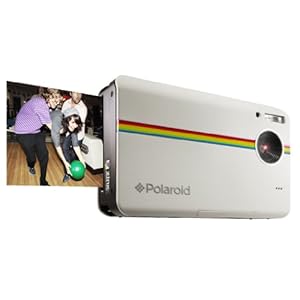
I Would Have Thought It Was April Fool's Day, But Here's a New Polaroid Instant Camera - Digital!

 
Polaroid Z2300 - Instant Digital Prints!
Image Source: www.amazon.com
 
Well, I suppose it had to happen someday. Polaroid is back in the instant camera business. The newly-announced Z2300 uses a digital sensor and has an integrated printer, which makes 2"x3" prints on the spot.
 
Pretty cool. Retails for $159.
 
(Click Here) to read the same story I did on ePhotoZine.
 
(Click Here) to read about it on Polaroid's site.
 
I sort of see this like an iPhone camera with a printer attached. It would be great for parties. I think it's great to see the combination of digital imaging and instant printing in such a small package. Gimmick? Perhaps. But, I bet the original Polaroid instant films were seen the same way, and they sure found more serious uses, such as for setting up large format images before committing to regular film.
 
Anyway - certainly something different, and that's worth something today.
 
DMC-365.blogspot.com


DMC-365.blogspot.com
 

Sunday, June 3, 2012

Photoville, New York - I Want To Go!

Photoville
Image Source: http://lens.blogs.nytimes.com/2012/05/15/theres-a-new-town-in-town/#/2/

Starting June 22, United Photo Industries (UPI) will host Photoville - a pop-up town exhibiting photography in exciting new ways. Photoville will be resident in Brooklyn Bridge Park in New York for two long weekends.

(Click Here) to read all about the event. There's even a kickstarter campaign to help fund the event.

This event is designed to engage everyone from talented amateur to seasoned professional photographers. I am sure there will be something for every photographer to learn by seeing the work of a wide range of others.
I guess it's remotely possible that I could go up since we have nice bus service from Virginia to NYC. Hmm... I need to think about that.

DMC-365.blogspot.com
 

Thursday, May 24, 2012

Pro Photographer Giulio Sciorio Writes About Professional Use of Micro 4/3 Equipment

 
Giulio Sciorio Writes About Pro Use of Micro 4/3
Image Source: http://blog.giuliosciorio.com/wp-content/uploads/2012/04/fear.jpg
 
 
Professional photographer Giulio Sciorio has posted a piece on his blog about the barriers (both real and psychological) to other professionals adopting Micro 4/3 camera gear for their pro work. I will review his main points below.
 
 
(Click Here) to read Giulio's full post.
 
 
Giulio outlines the following five barriers to professional adoption of Micro 4/3 equipment:
 
 
  1. It's not "professional" gear.
  2. There aren't enough megapixels.
  3. The noise levels are too high.
  4. It's not full-frame!
  5. Worries about what your professional colleagues will think.
First, Giulio identifies the concern over your clients not being impressed by the appearance of your gear, because it's not big, heavy, and expensive looking, as a real concern. He explains how he did two things to overcome this. First, he shot a series of street portraits with his Olympus Pen, and showed them to others before explaining what equipment they were made with. Second, he carried his Pen with his "professional" Canon gear, and impressed clients with shots made with the Micro 4/3 gear. For me, this is not a concern. That's because I don't really have clients. If anyone is interested in my photographs, it's because of the photographs, not the equipment. I'm not hired to cover any specific events, in general. If I were, I may try Giulio's "bring it along with the Pro gear" approach. Second, "there aren't enough megapixels." Giulio explains that even large format magazines need only around 9 Mp for a full page image. As for me, I would argue that there are too many megapixels in some cases. More megapixels = more noise (see "Third..." below). And, since megapixels are the universal language of camera marketers, having too few will never be an issue. Third, noise. Giulio handles this one through the simple statement that while his Micro 4/3 images do have more noise than full 24x36mm sensor cameras, he has never had a complaint from a client. He considers it part of the rendering style of the gear. For me, the noise concern has some truth to it. Back to megapixels, if my Lumix DMC-G3 could achieve the same noise performance as my Nikon D700 24x36mm sensor camera, I'd happily give up any extra megapixels. From my point of view, the noise issue improves with every iteration of Micro 4/3 sensor design, and is now well under control for most print sizes, and certainly for images on the computer screen. Now that the technology has gotten to this point, I see this concern as the same one that photographers used to have to make regarding 35mm versus medium or large format film. The Micro 4/3 kit has become my 35mm film equivalent, and is every bit as capable, in my opinion, with lots of advantages. The Nikon D700 is my medium format equivalent. If I'm worried about making super large prints or approaching perfection, I can decide to carry the big, heavy Nikon.
The fourth concern is "it's not full-frame!" Giulio makes a great case on this one. Of course it's full-frame. Full-frame is all relative. If you really want to argue, 24x36mm (35mm "full-frame") is not full-frame to a medium format film photographer. It's the image quality that counts. I totally agree with Giulio on this point.
 
 
The fifth, final concern is "what will my colleagues think?" Giulio's point here is that it's not your colleagues' opinion that counts. It's your clients.
 
 
I have experienced this one, even though I'm not a pro. One of my good friends is an ardent Nikon DSLR user. He asked me
 
 
"What does Lumix give you that Nikon doesn't? What got you started with it?"
 
 
Well, I have to admit, this got me thinking. What really got me into Micro 4/3 was the ability to adapt legacy lenses. That's a minor advantage for me, now that there are great native Micro 4/3 primes. What really sold me was size, weight, reduction in back pain. What keeps me in Micro 4/3 is the awesome progress it has made recently. One final note on this. It is my belief that being a photographer who takes a different approach, one that is not initially accepted in the professional community, has a history of ultimate success. Just look at the Leica. Pros turned their noses up, with very similar concerns about the "small format" of 35mm film that we hear today about Micro 4/3. Then they saw the images that could be made with a small, flexible, fast camera. The rest is history.
 
 
Giulio's article was thought provoking and useful for me.
 
 
Sumo Crossing, by Reed A. George
Panasonic Lumix DMC-GF1, Lumix 20mm f1.7 lens
iso100, f5.6, 1/100 sec
 
One of the things I love about this image is that the sign on the store across the street, which sells sumo souvenirs and the like, has a sign that reads "Kingu Saizu" in Japanese ("King Size" in English).
 
Small, fast cameras are fun and productive.
 
DMC-365.blogspot.com


DMC-365.blogspot.com
 

Saturday, May 12, 2012

Useful Article on Printing Resolution at digitalphotopro.com

 
Table Source: http://www.digitalphotopro.com/technique/workflow/the-right-resolution.html

How do you decide what print resolution to use when printing your digital files? Do you always just set it to 300 dpi and forget it? Just use the native resolution of the image? I have known that you can get by with lower resolution printing for larger images, but didn't really know how to calibrate that. I have also learned the trick of increasing resolution to 360 dpi when I make large prints of smaller resolution images.

(Click Here) to read the whole article, which leads me to somewhat different conclusions.

First off, the table above. This table reinforces the idea that you can get by with lower print resolutions for larger prints. For example, a 3.5" x 5" print is normally viewed from 10-12" distance, meaning about 300 dpi is correct.

However, this article finds that there is benefit in printing to 360 dpi resolution with Epson printers (mine is Epson), 300 dpi for Canon, regardless of final print size. So, conclusion 1 is that you should print at 360 dpi for any print size, even if your file isn't that high in resolution. The article explains how to do this from Lightroom.

The second conclusion is that if your original file is even higher resolution than the Epson native resolution of 360 dpi at the size you want to print, you should NOT decrease the resolution. In fact, you may benefit from increasing the resolution to 720 dpi, if you have an Epson Pro printer, which has a maximum detail resolution of 720 dpi.

This article goes far in demonstrating the differences, yet results in simple conclusions. Very helpful.

DMC-365.blogspot.com