Showing posts with label wireless. Show all posts

Friday, December 7, 2012

Those Blasted Pop-Up Flashes

 
Shot With Panasonic Lumix DMC-GF3 by nonnit on mu-43.com
 
Anyone who's used one knows the limitations of those little pop-up flashes that are built into your cameras. Nearly every photography seminar I've attended tells you to leave them down, rip them off, whatever, don't use them. On a few exceptions, I've been told to use them the opposite of your first thought: turn them off inside or in low light, use them outside or in bright light for fill-in flash.
 
Those little flashes have a few major problems. First, they're small. That means they have low light output, and are only good close up to your subject, if you're relying on them as the main light in picture. Second, they are built-in. That means that they're optimally placed to give you "red eyes" in your subject, as the light coming from the flash reflects directly back into your lens. Finally, they give very harsh light. This is a result of them being very small sources (nearly point sources) of light, and being directly aimed at the subject. They can really make a nice-looking person ugly.
 
So, what are they good for? If you can dial down the intensity, they're fine for fill-in flash in otherwise good lighting. For example, if you're taking outdoor pictures in strong midday light, that little flash can fill in those deep black shadows under your subject's eyes, and provide a little catch-light at the same time.
 
They can also be used to trigger other flashes wirelessly.
 
nonnit on mu-43.com demonstrated both in his recent post of images shot with a Panasonic Lumix DMC-GF3.
 
(Click Here) to see nonnit's post on mu-43.com
 
So, don't literally rip that little flash off of your camera; just use it very carefully.
 
DMC-365.blogspot.com


Friday, November 30, 2012

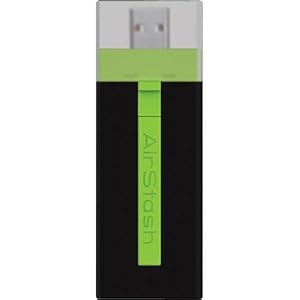
More Unfulfilled Promise - the Maxell Airstash

 
Maxell Airstash
Image Source: http://www.amazon.com/Maxell-AirStash-Expandable-Capacity-Wireless/dp/B006473T92/ref=sr_1_2?ie=UTF8&qid=1354189519&sr=8-2&keywords=maxell+airstash
 
So close, but yet so far. Let me save you some reading if you like: AIRSTASH DOES NOT ALLOW TRANSFER OF RAW FILES FROM THE IPAD.
 
My Airstash arrived yesterday, and after a few blips in upgrading the firmware, was ready to go. Very promising. The app (Airstash+) actually has a simple interface. Click the little camera icon, and you can say whether you want to import (from Airstash to iPad) or export (to the Airstash), select your images, and go. So, I did a test with ~250 images stored on the iPad (in both jpeg and raw) during a meeting. I was elated. Within 40 minutes it was done. So cool!
 
The transfer rate was not fast, but certainly acceptable. The devise design is nice - it's very small, light, not much more in your bag than a normal SD card - USB adapter.
 
Then came the final part of the test. Plugging the Airstash into my desktop, I looked at my transferred images. What? No raw files! Just jpegs. The transfer changed all of my raws into jpegs.
 
I thought there must be a setting that I missed. There isn't. In fact, there are so few settings that I scanned all of them three times in a few minutes. So, reluctantly, I called the 24/7 Maxell service line.
 
After a several minute hold, I got a real person. He immediately told me that I'd have to do some internet research, and that this functionality was on the app end, which is produced by a third party. I replied that I had read the MAXELL web page extremely carefully before making this purchase, and that it clearly indicated compatibility with raw files. After pushing back, he agreed to talk with someone else there at Maxell. He came back on the phone after consulting with the Airstash Support Manager, and informed me that the software automatically converts raw files to jpeg upon export to the Airstash. There is nothing you can do to change that. I calmly informed him that this "feature" makes the device completely unhelpful to serious photographers, and it's on its way back. He said "Okay, thank you!" and we were done.
 
A couple of you have suggested divorcing from Apple for this function. I'm afraid I may have to agree with you. I'm so hooked on the iPad interface and apps for other purposes, it is difficult to consider something else. But, it just won't seem to help me out here.
 
I thought Apple's strongest core of users came from the arts, science, and imaging worlds. How can they not see the need to give this to us photographers?
 
I'm going to take a break from this pursuit for a while. I'm not doing any more big travel until spring...
 
DMC-365.blogspot.com


Wednesday, November 21, 2012

Are We Almost There? With Unobtrusive Wireless Backup, That Is?

The iPad (2, in my case) has become a major part of my life, even though I'm an Apple curmudgeon in general. And, as you may know, I still have a love for cameras that don't need a battery. But, the iPad is dragging me, kicking and screaming, into this millenium.
 
I am committed to using the iPad as backup and viewing of my photos on travel. Right now, I use the Apple SD adapter, and get a second copy onto the iPad as soon as possible after shooting. However, I typically keep the original copy on my SD card, which means having a lot of SD cards with me. So far, uploading the files to the web is too slow to be a useful third copy. Or, wireless connection in hotels is spotty enough to make it really hard. And, my iPad only has 64Gb total storage, which includes all of my business apps and work.
 
I've been looking at wireless hard drives, like the the Seagate GoFlex, which is essentially a wifi-capable mechanical hard drive.
 
(Click Here) to see the GoFlex on Amazon.
 
I've read some mixed reviews of how it works, so have not pulled the trigger.
 
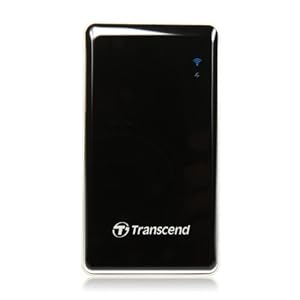
Now, this morning, I saw my first solid state (as in "no moving parts") wireless hard drive, the Transcend StoreJet Cloud:
Image Source: http://www.amazon.com/Transcend-TS64GSJC10K-Information-Storejet-Cloud/dp/B006L42TL2/ref=sr_1_2?ie=UTF8&qid=1352461300&sr=8-2&keywords=storejet+cloud
 
The storage capacity isn't huge (64 Gb), but not bad, either. This device is marketed for use in taking all of your music and videos with you when you travel. I want to turn it around, and use it to back-up the photos I take while I'm out. I need a demo to convince me that's possible.
 
(Click Here) to see the Storejet Cloud on Amazon
 
The process I'm considering at this point is to continue to use the Apple card adapter to transfer images from my SD card to the iPad, then back it up wirelessly to something like the Storejet Cloud.
 
Then, I see this:
 
Image Source: ephotozine.com
 
(Click Here) to read about the card on ephotozine.com.
 
This is a Wi-Fi enabled SD card, which is designed specifically for use with iPad (iOS) or Android devices. If it works as I envision, I can upload directly to the iPad without the Apple adapter. I'm sure it will be slower, but it even has a mode where it will do it as I'm shooting. Now, if that ever negatively affected my shooting, it would be turned off forever. But, think how great it would be to have a backup of everything you shoot being made as you shoot, through a direct wireless connection between your camera's SD card and the iPad in your camera bag. That would be cool.
 
I don't know if it works that way.
 
Also, one more question - if I bought the StoreJet Cloud and the Wi-Fi SD, could I have the card make copies to both the iPad and the wireless hard drive at the same time? Ideally, I could save a jpeg version to my iPad, and both raw and jpeg to the hard drive.
 
Tough customer, aren't I? If this worked, I'd buy both the card and hard drive today. I think the chances of all the integration points working is very slim.
 
Note to Transcend: You now have all the pieces. Make it happen for me.
 
DMC-365.blogspot.com


Saturday, March 17, 2012

Digital Photography Now Reports Panasonic's Efforts to Make Wireless Connections for Lumix Cameras

Panasonic's Wireless Connectivity Plan
Image Source: http://dpnow.com/8569.html

Digital Photography Now has published a report on Panasonic's plan to provide simple wireless connection between Lumix cameras and Viera televisions, and to cloud-based storage.

(Click Here) to see the whole report on Digital Photography Now.

Personally, I would love to have real-time automatic wireless upload of my images to the web, cloud, and my PC. Connecting to the TV means a lot less to me. If real-time is not feasible, I would be happy with automatic batch uploading of my files while my camera sits in the bag, after I get home from a shoot. But, and please listen Panasonic, I want to be able to turn it off quicky, so that my device won't be "busy" if I wantto shoot an image real quickly.

The other thing that worries me a little is that it appears that Panasonic will make their cell phone (which I don't think is available in the USA at this time) a critical piece in the wireless system. That would be a serious drawback here in the USA, even if the phones were available. It would also be market-size-limiting, given the extremely strong cell phone competition here (do you really want to depend on Americans giving up their iPhones?), and our desire to mix and match suppliers at will.

All that said, I am up for improved connectivity!

DMC-365.blogspot.com