Showing posts with label strobe. Show all posts

Thursday, July 10, 2014

Whirling Disks and Rear Curtain Sync

Rear curtain flash sync is a function on many cameras. The way it works is that instead of triggering your flash when your shutter opens (generally for a much longer time than the length of the flash light pulse itself), it opens the shutter, then triggers the flash right before the shutter closes.
 
Why would you want this? Well, if you're using a slow shutter speed, you'll get motion blur or light trails from anything that's moving fast. With normal (front curtain) sync, the flash goes off, the shutter stays open, and you get trails that are made after the flash. With rear curtain synch, the trails are made first, then you get flash and light the rest of the scene at the end of the exposure. The classic example is a moving car, where you get an image of a car that's already gone by you, with fantastic blur behind it. Using front curtain sync, you'd get the car before it passes by, and light streak in front of the car, not nearly as cool.
 
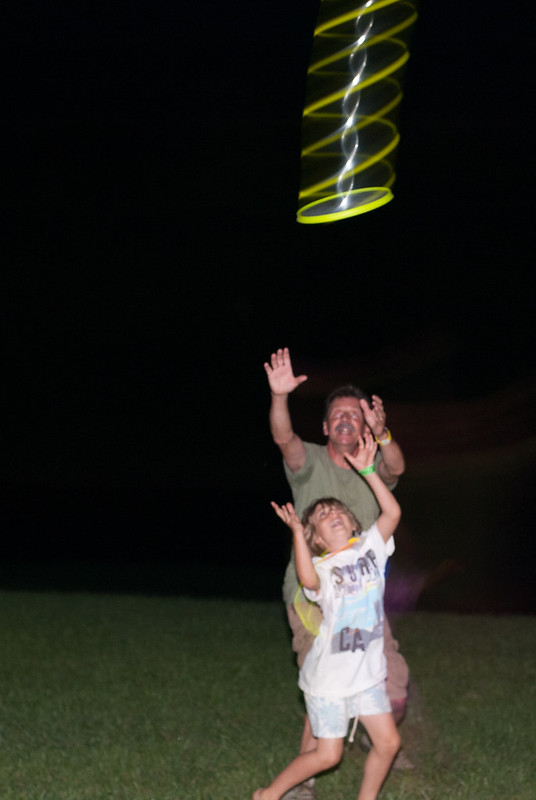
Well, I find it's pretty difficult to find applications other than moving cars for this cool technique. At the River and Roots music festival, I found one. These guys were playing what I would normally call "Frisbee," but with a disk that has its own light in it. They were playing in the dark. I thought, hmm. I bet that disk would make a great light streak. So, I tried it. Amazing! It made this really cool nested helix shape as it flew by. Next step, try rear curtain sync to see if I could capture the streaks and the player. Here's how that looks:
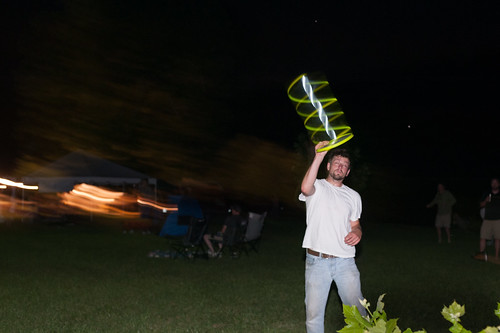
 
I like this shot a lot, but I wanted the streaks to be longer, and I didn't like the distracting lights in the background (at left).
First, the background lights. One of the other players was near the river, which was completely dark. Goodbye background distractions:
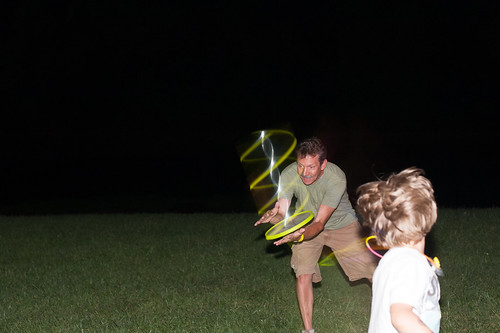
Getting the timing just right was tough, but I was getting the hang of it.
So, how to lengthen the light trails? Longer exposure, of course. So, I went to a full second exposure, with the flash at the end. Since the ambient scene was so dark, I didn't even have to change my f-stop or flash settings. This is exactly the effect I was looking for:
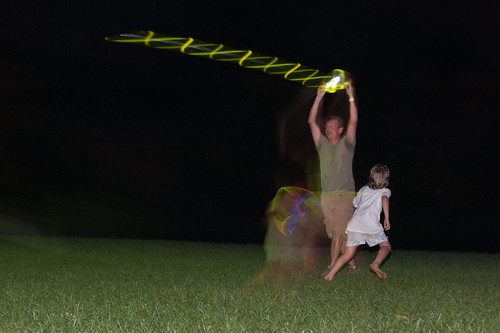
Whirling Disk, by Reed A. George
Nikon D700, Nikkor AF-D 50mm f1.4 Lens
iso 1600, f4, 1 second exposure, rear curtain sync flash
 
Great fun. I don't think any other photographer at the festival captured a shot just like this.
 
DMC-365.blogspot.com


Saturday, August 3, 2013

Skeletons From The Closet - More Results From May's Autocord TLR in the Studio

I had a roll of film in the Autocord since May. I finished it up, and share some results today. These shots were made during my studio session with musician friend Melissa Wright.
 
(Click Here) to see the images I made of Melissa with the Nikon D700.
 
Near the end of our session, I asked Melissa if she minded being patient with me, long enough to shoot some pictures with my old film camera. She agreed. This entailed connecting up my sync cord to the studio wireless transponder (what a combination of technologies, huh?), putting my Rolleinar closeup lens on, and transferring exposure info from the D700 at iso200 to the Autocord, where I was shooting Portra 160 film. Here's the result.
 
Melissa Wright, by Reed A. George
Minolta Autocord, Kodak Porta 160 Color Print Film
 
I think I did okay on exposure and focus. This was at the end of our session, so Melissa was undoubtedly tired of being photographed, but she hung in there. The old Autocord did a pretty good job.
 
Here's a shot that I've rendered in both color and monochrome. Which do you prefer?
 
Monochrome or Color?, by Reed A. George
Minolta Autocord, Kodak Porta 160 Color Print Film
 
It really was pretty hard to see through the Autocord finder to focus, even though this camera has the brightest finder of any Twin Lens Reflex (TLR) I've used, including several Rolleiflexes. I have trouble imagining shooting the whole session with this camera, but it sure added to the fun. I suppose brighter modeling lights, or hot lights (instead of strobes) would make focusing easier.
 
That said, the Autocord is a joy to shoot, especially in good ambient light. It's one of the cameras I have trouble putting back in the closet after its month in the sun.
 
Avedon did the bulk of his shooting with a TLR in the studio. He must've figured it out.
 
DMC-365.blogspot.com


Friday, December 7, 2012

Those Blasted Pop-Up Flashes

 
Shot With Panasonic Lumix DMC-GF3 by nonnit on mu-43.com
 
Anyone who's used one knows the limitations of those little pop-up flashes that are built into your cameras. Nearly every photography seminar I've attended tells you to leave them down, rip them off, whatever, don't use them. On a few exceptions, I've been told to use them the opposite of your first thought: turn them off inside or in low light, use them outside or in bright light for fill-in flash.
 
Those little flashes have a few major problems. First, they're small. That means they have low light output, and are only good close up to your subject, if you're relying on them as the main light in picture. Second, they are built-in. That means that they're optimally placed to give you "red eyes" in your subject, as the light coming from the flash reflects directly back into your lens. Finally, they give very harsh light. This is a result of them being very small sources (nearly point sources) of light, and being directly aimed at the subject. They can really make a nice-looking person ugly.
 
So, what are they good for? If you can dial down the intensity, they're fine for fill-in flash in otherwise good lighting. For example, if you're taking outdoor pictures in strong midday light, that little flash can fill in those deep black shadows under your subject's eyes, and provide a little catch-light at the same time.
 
They can also be used to trigger other flashes wirelessly.
 
nonnit on mu-43.com demonstrated both in his recent post of images shot with a Panasonic Lumix DMC-GF3.
 
(Click Here) to see nonnit's post on mu-43.com
 
So, don't literally rip that little flash off of your camera; just use it very carefully.
 
DMC-365.blogspot.com


Wednesday, March 28, 2012

External Flash For Panasonic Micro 4/3 - I Bought the Nissin Di466

 
Image Source: www.amazon.com
Nissin Di466 External Flash for Micro 4/3

Well, I have once again come back to the subject of external flash for my Lumix DMC-G3s. I really dislike the fact that the Lumix cameras do not allow you to control flash in any type of manual way. Yes, you can compensate up or down by up to two stops on the G3, but only based on the camera's ttl exposure system. I have been largely unable to use the in-camera flash for daylight fill.

I did find that I can use my (huge) Nikon flashes (SB600 or SB800) with the Nikon remote cable in manual mode with the G3. But, in that case, only manual mode. Also, as I understand it, wireless triggering from the Lumix cameras does not work with the Nikon flashes, because the Lumix uses a preflash that prematurely triggers the Nikons. Now, that is based on what I have read; I have not tried that myself.

I read a post on dpreview on this subject, which reviews several options, including the Olympus FL360, as well as products from Cactus, Metz, and Nissin. From what I can surmise, the Nissin offers the best combination of features, including bounce capability (tilt but not swivel, which means bounce flash in landscape only), ttl and manual, and wireless triggering.

(Click Here) to read the post on dpreview. It is worth clicking through all of the replies, each with additional information.

A month or two ago, I decided to buy the Nissin Di466, which goes for about $130 on Amazon, but it was out of stock. It is now in stock, so I clicked that dangerous little "Add to Cart" button and bought it. Since I have Amazon Prime, I got free shipping, and will receive it in two days.

I usually like to have a new little something to test out (but not rely on) when I go on a trip. This will be the gadget for my upcoming trip to Japan. I'll let you know how it works. Hopefully,I'll have some nice sample pics to share.

DMC-365.blogspot.com


Saturday, February 4, 2012

Water Droplets With Lumix DMC-GX1 On Admiring Light Blog

 
Blue Water Droplets by Jordan Steele
 Water Dropletsby Jordan Steele, Admiring Light
Lumix DMC-GX1, Pana-Leica 45mm f2.8 Macro-Elmarit
Image Source: http://admiringlight.com/blog/blue-droplets-frozen-in-time/

Jordan Steele, Founder and Editor-in-Chief of the blog "Admiring Light" shared some images of water droplets:

(Click Here) to see the article and more images.

I have done a little bit of this type of photography myself, using light triggers and delays to get the timing right.  As a matter of fact, I was setting the rig up again last night, after a very long hiatus.  I thinkndroplets have been overdone.  But, maybe they are like flowers, meaning that they've been photographed to death, but you still see new incredible images all the time.  Regardless, I am trying to get my trigger circuits back in order, and think of some new applications.

Now here's the incredible thing about what Jordan produce - he did it manually!  That's right, he just took a lot of images, triggering the shutter as he saw a droplet exit the eyedropper he was holding with his other hand.  I'd say he should be proud of these images.

DMC-365.blogot.com

Monday, January 23, 2012

A Couple of Examples From the Fossil Shoot

In my earlier post today, I showed the setup I used to start photographing the fossil samples at the Calvert Marine Museum.  I thought it may be useful to show a couple of examples of the images taken.

Keep in mind, these are for scientific and not artistic purposes.  They were shot in the smallest file size available on the Nikon D700 (2,128 X 1,416 pixels) in order to save time and storage space.  I did my best to optimize the lighting to show the features of the specimens, using cross-lighting with two flashes.
Conradostrea Sp., Image 1
Conradostrea Sp., Image 2
Panopea Americana, Image 1
 Panopea Americana, Image 2

DMC-365.blogspot.com