Showing posts with label free. Show all posts

Monday, June 15, 2015

Discontinued Agfa APX400 Film - Testing and Tuning Up

My friend Dennis Gallus gave me a 100' roll of Agfa APX400 that he had in his freezer. I shot my first roll of it at the indicated speed of 400, and processed it alongside a roll of Ilford HP5, which I developed for 11.5 minutes in Kodak D-76 developer at 1:1 dilution. Those negatives came out pretty thin overall and very low contrast (underexposed and/or underdeveloped). After reading some old posts online, I learned that APX400 was known to need additional exposure, with some people treating it as iso 320 film, others at iso 200. I also found development guidelines that indicated it needed more development.
 
So, a test roll ensued. I shot a short roll of the film, capturing the same scene exposed for iso 100, 200, and 400. I also changed my development protocol to 10 minutes in full strength D-76. Here are a couple of the results.
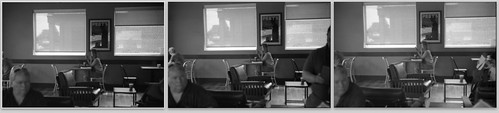
 
Scenes exposed at iso 400, 200, and 100, APX400 Film
 
From this, I conclude two things - 1) additional development in full-strength D-76 definitely helped, and 2) somewhere between iso 200 and 320 is probably best for this film.
 
On the same day, I guessed and exposed a full 36 exposure roll at iso 200. It looks pretty good overall. I think I've figured out this film. Not that this information is much use to anyone else; as far as I know you can't get this film any more, though I do see single rolls for sale in some places. But, 100' of it will keep me busy for a while!
 
Thanks again, Dennis!
 
DMC-365.blogspot.com
 

Tuesday, July 15, 2014

Film Photography Project (FPP) Giveaway - My Sigma 400mm f5.6


I attended the FPP Walking Workshop back in May, and won two great pieces of gear in the giveaway - a Nikkormat FT3 and a Sigma pre-AI 400mm f5.6 telephoto lens. Of course I had to try this big old lens, so I mounted it on my plain prism Nikon F body and took it on the FPP walk to a local military commemorative event. Here are two examples of what I got.
 
At first, this young guy wasn't sure about having a 400 mm lens pointed in his direction. Than he settled down and had some fun "shooting" the 50 caliber machine gun on this vehicle.
 
Rat-a-tat-tat!, by Reed A. George
Nikon F Film SLR, Sigma 400mm f5.6 Pre-AI Lens
 
I was pleasantly surprised by the sharpness of this old lens. Shooting iso 400 film, I was able to keep the shutter speed up at 1/1000 of a second, which allowed me to handhold the lens. The lens is a little low in contrast, but I find the result quite nice. Thanks, FPP!
 
(Click Here) to learn more about the FPP.
 
DMC-365.blogspot.com
 

Saturday, June 29, 2013

Over - A Nice App For Adding Text to Images on iPad

 
Just Playing Around
 
You know how Starbucks has those little cards giving away a free App or song each week? This week's App in my local store is called "Over." Over is an image editing program, which allows you to add text or art to your pictures. Pretty darned cool.
 
I downloaded Over from the App store, and played around a little with it, just using images that were already on my iPad. This is a very simple way to add text to your images. I'm thinking of making electronic postcards from your beach vacation, for example. Here's a hint: once you've added text and hit "Done," use the yellow arrow on the right of the screen to find options for how to modify it. The options that come up are on a wheel, which you can spin for more options. I'm sure this doesn't make sense, but it will once you open the App. Finding the wheel is necessary to be able to save your image, for example.
 
Here's another image I played around with:
 
Could Be Useful
 
Hmm. No bad for the price (free).
 
DMC-365.blogspot.com


Monday, March 18, 2013

My Panasonic Lumix DMC-LX7 Real World Guide is Available on the Amazon Kindle Store! $2.99 or Free for Prime Members!


Want to learn how to quickly set up and use your DMC-LX7 without wading through >200 pages of Panasonic user manual? I have finished writing my guide for how I set up and use my Lumix DMC-LX7. It's now available on Amazon.

I share exactly how I set up the camera for street photography, travel, and macro, and explain many of the less-obvious functions of the camera.
 
(Click Here) (or use the Amazon link below) to buy it for $2.99, or borrow it for free if you're an Amazon Prime member. It's currently available in Amazon's Kindle format. After 90 days I may make it available in other formats.
 
By the way, $2.99 is the lowest price that Amazon allows. I want it to be affordable, and I also want to
have the convenience of using Amazon's automatic distribution. Twenty pages of information for $2.99 seems reasonable.
 
I hope you enjoy it!
 
DMC-365.blogspot.com


Sunday, August 5, 2012

"Twins" Wins! Adam Wins the Sony eReader!

 
The Twins, by Adam Bucci
Image Source: http://www.flickr.com/photos/adambucci/7616904628
 
I didn't say this up front, but I want everyone to know who the judge was for the DMC-365 photo contest - it was my eleven year old daughter, Christine. She's a bit of a joker herself, and really loved this shot. When asked for why she selected it as the winner, she said:
 
 
"It's funny. The color is great. They really do look like exact twins. The clouds look nice, and you can tell it was taken in the wilderness."
 
So there you have it.
 
We had several great entries - thanks everyone for participating.
 
(Click Here) to see all the entries.
 
I'm already thinking of the next giveaway, and think I have something that may be a little more in demand.
 
Hope you all enjoyed the contest.
 
ADAM - Please send me your mailing address so that I can get your eReader on its way!
 
DMC-365.blogspot.com
 
 
DMC-365.blogspot.com
 

Saturday, July 21, 2012

DMC-365 is Giving Away a Free Sony eReader! Enter Your Picture on Flickr!

 
DMC-365 Giveaway Prize!
Sony Reader PRS-950 - Enter on Flickr!
 
Let's have a little photo contest here on DMC-365!
 
The prize is a barely-used Sony Reader Daily Edition (PRS-950), with these features:
- Touch screen
- Wifi and 3G
- Audio player built-in
- Compatible with Sony Reader Store, Adobe pdf, other formats (not Amazon Kindle, however)
 
 
The reader works fine; I've just changed to the Kindle format, even though this one's compatible with many formats, and cost me $300 a little over a year ago!
 
You'll need to have a flickr account to enter (it's free).
 
To enter the giveaway:
 
1. Post a picture in the flickr group at this address:
 
http://www.flickr.com/groups/1988936@N25/
 
or (Click Here) to go directly to the flickr group.
 
Pictures must be taken with a Panasonic or Leica-branded Panasonic camera. Deadline is midnight 8/4/2012.
 
2. Include the tag "DMC-365" in your picture's tag list.
 
3. Leave a comment here (below), telling me that you've added the picture.
 
 
Enter up to ten images. There is no restriction on photo subjects (just have to be safe for all to view). Will only ship the prize to a continental US address.
 
The lucky winner will be contacted through flickr mail, and posted here. The Reader is completely free, and I'll pay to ship it to you (all entries must have a shipping address in the continental US).
 
I'll announce the winner and show the winning image by 8/11/2012.
 
Good luck!
DMC-365.blogspot.com
 

Sunday, June 10, 2012

Final Two Chapters of My Free G3 Settings eBook Available For Download! Get the Whole eBook Here, Free!

Lumix DMC-G3 by Reed A. George
Panasonic Lumix DMC-G3 and Nikon Nikkor AIS 28mm f2.8 Lens
by Reed A. George
 
Well, since I'm expecting the announcement of a new Panasonic Lumix Micro 4/3 body (the rumored DMC-G5? DMC-GH3?) any time now, I figured I had better wrap up my ebook on how I use the DMC-G3. In fact, I use two of them.
 
The final installment includes a chapter on setting up custom configurations, and a short chapter on my conclusions on the camera.
 
I learned a lot by working through every detail of how to set up this camera. And the best thing is, now that I've done it, and saved some custom configurations, I can forget about the details of what many of those menu settings actually mean. This camera has so many options, it's amazing. But, I want to set most of them once, and forget them. Custom Modes help a lot, as does the Quick Menu.
 
(Click Here) to download the final two chapters of my ebook, in Adobe pdf format.
 
For ease of navigation, I'm including links to the previous chapters below:
 
(Click Here) for Chapter 1 - Introduction and External Controls
 
(Click Here) for Chapter 2 - Menu Settings
 
(Click Here) for Chapter 3 - Focusing
 
I hope that you'll find them useful.
 
I recommend that you download and save all of them; I will consolidate them into a single file, but cannot guarantee that it will remain available for free forever...

 
DMC-365.blogspot.com
 

Monday, May 28, 2012

Chapter 3 of My eBook on the G3 Is Now Available For Free Download!

Panasonic Lumix DMC-G3
with Nikon Nikkor 28mm f2.8 Manual Focus Lens

If you've been following the development of my eBook, you may be interested to know that Chapter 3 is now available for free download. Chapter 3 takes on the subject of focusing - both the extensive autofocus (AF) technologies and the superb manual focusing tools resident in the DMC-G3.

(Click Here) to download Chapter 3 - Focusing


As a reminder, here are the links to the posts for the first two chapters:
 
(Click Here) for Chapter 1 - Introduction and External Controls
 
(Click Here) for Chapter 2 - Menu Settings
 
Writing this chapter helped me to work through some questions I had with AF settings. Probably the most important thing I learned is how cool Pinpoint Focus can be when used in conjunction with the Touch Screen. As a regular user of the Electronic View Finder (EVF), I don't use the Touch Screen often. However, after trying out Pinpoint Focus, I now have it in mind should the opportunity present itself.
 
I hope you're enjoying the eBook! Please comment, drop me a line, or even purchase something on Amazon by clicking through the link below. It doesn't cost you anything extra.
 
Enjoy!
 
DMC-365.blogspot.com


Sunday, May 13, 2012

Free Again! Chapter Two of My eBook for How To Set Up Your DMC-G3 Is Now Available For Download

DMC-G#
Image Source: http://www.imaging-resource.com/PRODS/DMCG3/ZURBE.JPG

My second ebook chapter on how I set up and use my Panasonic Lumix DMC-G3 is now available.

This one took a long while to write. In Chapter Two, I go through all of my settings in the Recording, Custom, Setup and Playback menus. These are the settings that most affect my daily shooting.

(Click Here) to download Chapter Two in Adobe pdf format.

Again, if you appreciate this document, drop me a comment, tell your friends, purchase your Amazon items by clicking through from this blog, etc. Any support is always appreciated.

Most importantly, if you see any mistakes, let me know!

My plan is to follow up these initial two chapters with some information about custom settings, and some real applications with the camera. Chapter Two is purely focused on menu settings, which I am glad to be through, to be honest.

I hope you find this useful. Let me know!

DMC-365.blogspot.com


Sunday, May 6, 2012

Free! My First Installment of an ebook on How to Set Up Your DMC-G3!

Image Source: http://shop.panasonic.com/shop/model/DMC-G3KK
 
Ok, folks, for those of you who are Panasonic Lumix DMC-G3 users, I've embarked on a project to document how I set mine up, and share it with all of you.
 
There is a dizzying array of menus and settings on the G3. I worked through all of them, at least to some extent, and documented not only HOW I set them, but WHY. Now I don't expect you to agree with all of my settings, but at least you'll know what you're disagreeing with, if you decide on a different setting.
 
I have completed the first chapter, which I share here with you now.
 
(Click Here) to download the first installment of my G3 Settings Manual in Adobe pdf format.
 
The second chapter, much more extensive, outlining my settings for the Priority, Shutter, and Aperture Priority and Manual modes, is nearly finished. It will be distributed in the same way.
 
All I ask in return is that you buy your Amazon items by clicking through from my site. That really hasn't paid off yet; I think I'm up to about $15 revenue, total, ever. Of course, if you'd like to contribute directly to this blog, rather than buying things from Amazon (on which I make a very small percentage commission), you can always send me Paypal at rgeorge911@hotmail.com.
 
But, I'm really not in this for the money. It would be great to bring in enough to pay my annual flickr and smugmug bills...
 
I sure hope you find this manual useful. I actually learned some things in the process of writing it.
 
UPDATE 5/13/2012: Chapter Two is now available as well! (Click Here) to get it.
 
DMC-365.blogspot.com